- Select Language
RT81 4G Rugged Tablet | 10.1" FHD 400nit | Qu...
Full SpecificationsModelHotus ST9‑MOSWindows 10/11...
The N60 PDA is a cutting-edge device for inventory...
The T80 handheld PDA combines advanced barcode sca...
Full SpecificationsModelHotus ST13‑JOSWindows 10 P...
In an education setting, time is the scarcest resource of all. Lose ten minutes of every class to a frozen workstation, a drained battery, or a touchscreen that will not respond, and the losses compound quickly into days of lost instruction by the end of the semester. When a school deploys the WTR PRO AMD, HTNJ08A Rugged Tablet, and HTNJ08B Rugged Tablet across its classrooms, a consistent maintenance routine becomes the most reliable way to safeguard teaching time. This guide walks through cleaning and disinfection, battery management, system updates, drop protection, and the seasonal checkups that keep education hardware dependable all year long.
Modern classrooms run on a mix of computing power and portability. The WTR PRO AMD anchors the lab and carries the heaviest workloads, while rugged tablets place interactive learning directly in students' hands. Yet none of this hardware performs reliably without routine care. Devices that are wiped down weekly, patched on schedule, and inspected for damage run longer, behave more consistently, and quietly reduce the expense of emergency repairs. The sections that follow cover maintenance for each unit in turn and finish with a semester plan that any IT team can put into practice right away. As part of a complete industrial solution for Education, these habits keep classroom hardware stable from the first week of term to the last.
A district that committed to this approach tells a familiar story. By November the lab PCs had grown sluggish, by January the tablets were running out of storage, and by spring the batteries could barely cover a single period. Once the team introduced a weekly cleaning routine, a termly update window, and a simple device log, hardware failures fell dramatically. That same fleet is still serving classrooms three years later.
The WTR PRO AMD usually sits at the center of the computer lab, running lesson software, streaming media, and supporting shared sessions across many student stations. Its most important maintenance concern is airflow. Classroom dust collects quickly, particularly near windows and doors. Keep the vents unobstructed, check the fan intake every two weeks, and clear accumulated dust with compressed air at least once a month. Never cover the vents with papers or cables, and leave a few inches of open space on every side of the unit.
Software maintenance deserves the same attention as physical cleaning. Schedule Windows updates for weekends or school breaks so lessons are never interrupted mid-session. Review manufacturer firmware, drivers, and security patches once a quarter, and maintain an image backup of the lab configuration so a problematic update can be rolled back in minutes. Cable management is an easy detail to overlook; label every power and display cable, route them neatly, and check connectors for bent pins during each monthly pass. If the lab also uses companion handheld devices, use the same maintenance window to confirm they still pair correctly with the main unit. For schools that want to standardize the computing backbone with dependable hardware, rugged mini PC solutions provide a stable foundation that is straightforward to maintain across multiple rooms.
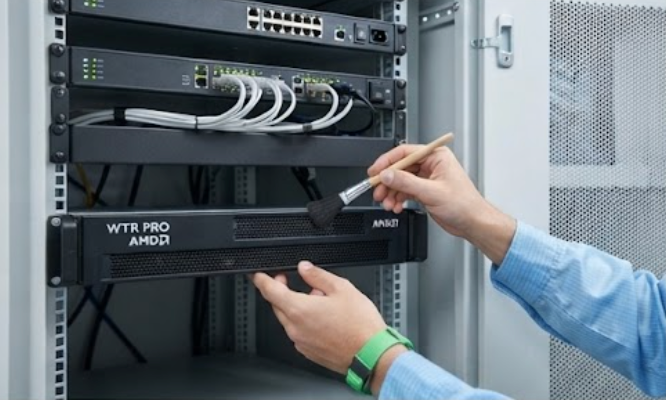
The HTNJ08B Rugged Tablet is designed for daily student use, which means fingerprints, spills, and the occasional drop are simply part of its life. For any device shared across classes, daily disinfection is the most valuable habit a school can build. Use a soft microfiber cloth lightly dampened with an electronics-safe disinfectant wipe, and never spray liquid directly onto the screen. Clean the display, bezel, and ports at the end of every school day, and repeat the process mid-day whenever a lesson involves food or hands-on materials. A weekly deep clean of the charging dock and cable contacts also stops corrosion from slowly degrading charging speed.
Battery health is the second priority. Lithium-ion cells age noticeably faster when they are regularly drained to empty. Encourage a charging routine that keeps tablets between 20 and 80 percent, and avoid leaving units fully charged and unused over long holidays. Once per term, run a full discharge-and-recharge cycle to recalibrate the battery meter. When students carry the HTNJ08B Rugged Tablet between classrooms, inspect the rugged case corners and port covers monthly, since damaged seals are the first route for moisture to get inside. A worn cover costs pennies to replace; a water-damaged tablet costs far more.

Younger students put the HTNJ08A Rugged Tablet through real abuse, and the rugged chassis absorbs impacts that would crack an ordinary consumer tablet. Even so, drop protection is a maintenance task, not a one-time feature. Inspect screen protectors at the start of each week; a scratched or lifting protector should be replaced before it starts to interfere with touch accuracy. Check the rubber bumpers and corner guards for looseness, and make sure the front camera and speaker grilles stay free of dust, which otherwise muffles sound during interactive lessons.
For the HTNJ08A Rugged Tablet, storage and transport deserve just as much care. Charge units on a clean, ventilated cart rather than stacking them in a closed drawer. During school breaks, store the tablets at room temperature with a partial charge, and label each device so students know exactly which unit they are responsible for. A periodic software review keeps classroom apps current, clears stale cached files, and frees up storage space. A simple rotation system, with an inventory sheet for each cart, makes it easy to track damaged units even when part-time staff handle the fleet.

Each device in this ecosystem has a distinct classroom role and its own care profile. The table below summarizes the recommended maintenance focus for every unit so the IT team can follow one consistent checklist instead of juggling separate habits.
| Model | Classroom Role | Daily Care Focus | Termly Checkup |
|---|---|---|---|
| WTR PRO AMD | Central compute hub for the lab | Dust removal, airflow checks, cable inspection | System updates, image backup, firmware review |
| HTNJ08A Rugged Tablet | Student handheld learning device | Surface disinfection, screen protector inspection | Battery calibration, app cleanup, bumper check |
| HTNJ08B Rugged Tablet | Mobile learning and field sessions | Port cleaning, case and seal inspection | Battery calibration, dock and contact cleaning |
A solid maintenance plan does not demand heroic effort, only a steady schedule. Start each week with a fifteen-minute routine: wipe down every device, spot-check the screens, and confirm that each unit is charged and logged in. At mid-term, go deeper, updating software, cleaning vents and docks, and recalibrating a sample of batteries across both tablet lines. At semester end, run a full inventory, back up lab images, and update all firmware before the devices sit idle through the break.
Keep a simple log of repairs and replacements for each device so failing units are caught before they disrupt a lesson. Assign clear ownership, one technician for the lab PCs and one for each tablet cart, and train teachers in basic troubleshooting such as forced restarts and charging checks. With consistent care, this hardware will comfortably serve for several school years. When the time comes to expand capacity or refresh older rooms, you can explore our mini PC solutions to find upgrades that fit the very same routine. Preventive care turns the WTR PRO AMD and rugged tablet fleet into a quiet, dependable partner for every lesson.