The compliance pitch for virtual desktops usually fits in one sentence: the data never lands on the endpoint. Architecturally that is correct, and at audit time it is nowhere near sufficient. An auditor does not skip the endpoint because the files live in a data centre; the auditor starts at the endpoint precisely because it is the least controllable part of the estate. It sits in a public corridor, on a shared ward desk, or bolted to the back of a monitor, and it is the thing that decides who sees what, whether a credential is cached, whether a screen can be read over a shoulder, and whether anything survives after the unit is returned at end of lease. This article follows the order in which data actually moves through a thin client session and shows what each link has to prove. If you are planning the hardware side of that conversation, start with dedicated thin client VDI solutions and then work link by link rather than certificate by certificate.
💡 Why Auditors Start at the Endpoint, Not the Data Center
Centralising storage solves one problem and exposes another. The data centre is a controlled room with badge access and a log of everyone who entered. The endpoint is a device bolted to the back of a monitor in a corridor that two hundred people walk down each day. What an auditor wants to know is not where the file lives but what the device in the corridor can leak: cached credentials, screen content visible from an angle, a spare USB port nobody disabled, or a local log that was never configured to rotate. "Zero data at the edge" is a claim about architecture. The endpoint still has to be hardened, inventoried, and provably wiped, and that work is what the audit actually examines.
Firmware and Secure Boot on the Smallest Node
The smallest units are the easiest to forget and the most exposed, because they get mounted behind displays and out of sight for years. Firmware integrity is the first link: a node that boots an unsigned image has already lost the argument before the desktop loads. The Palm-sized miniPC supports a locked boot chain and a firmware write-protect setting, so an image has to be signed before the unit will execute it. Physical containment is the second link: a VESA mount behind a locked monitor bracket, or a chassis lock that stops someone walking off with the whole node. Port control is the third, since an unattended mini PC with a live USB port is an unattended copy machine for anyone passing by.
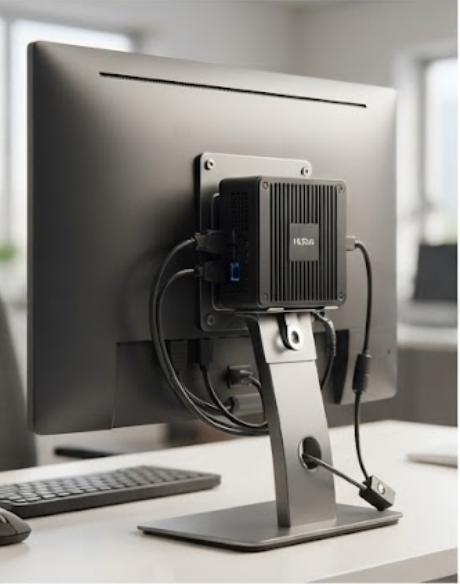
A Palm-sized miniPC mounted behind a locked monitor bracket, where firmware write-protect and port control do the compliance work.
Authentication Before the Desktop Ever Loads
The credential is the object an attacker actually wants, and the endpoint decides how it is handled. In a well-built VDI deployment, authentication happens before the session is established: the user presents a card, a token, or a biometric factor, the broker validates it, and only then is a desktop assigned. The endpoint should hold nothing reusable afterwards. That means no plaintext credential cache on the unit, no saved password in the thin client image, and a session that terminates cleanly on card removal so the next person at a shared desk starts from zero. This is also where single sign-on earns its keep, because one strong authentication event can gate every application without the user typing a password into five different boxes.
What Travels Over the Wire and What Stays Behind
What crosses the network in a thin client session is narrower than most people assume: pixel deltas, keyboard and mouse events, audio, and any peripheral traffic the policy permits. The document itself never leaves the data centre, which is the whole point of the architecture. The compliance work sits in proving that the channel is encrypted end to end and that peripheral redirection is governed by policy rather than by default. The ST11-U rugged tablet is the unit most often deployed where staff move between desks, and on a shared floor the two settings that matter are encrypted transport and a USB policy that denies mass storage while still allowing a scanner or a badge reader. Letting everything through by default is how a zero-data architecture quietly becomes a copying architecture.
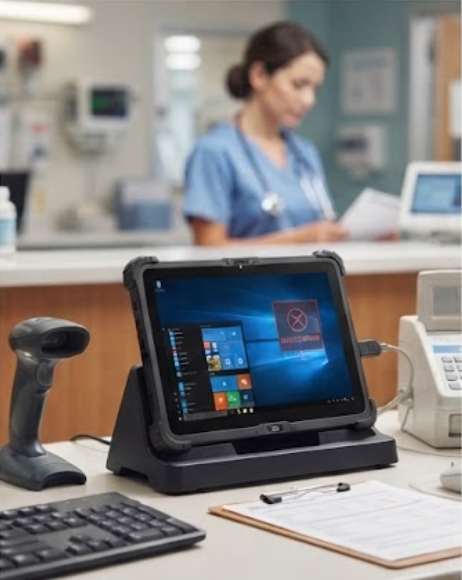
An ST11-U tablet at a shared workstation, where encrypted transport and a deny-by-default USB policy keep the session clean between users.
🖥️ Screen Size Is a Compliance Question, Not a Preference
Screen size reads like an ergonomics decision until someone in compliance asks who can see the display from the corridor. On a ward desk or an open-plan counter, a large panel facing the wrong way is a disclosure incident waiting for the right angle, which is why privacy filters and viewing-angle limits belong in the specification rather than in a memo. The larger ST13-U rugged tablet earns its place at fixed stations for the opposite reason: a thirteen-inch panel lets an auditor sit down and read session logs, asset tags, and configuration screens on the spot without squinting at a phone-sized display. Bigger is not better everywhere, but it is better wherever someone has to verify something in front of a third party.

A thirteen-inch ST13-U at a fixed station, large enough for an auditor to review session logs and asset records on the spot.
Log Retention and the Evidence an Auditor Will Ask For
Every link above produces a record, and the audit is essentially a request to produce those records in an organised way. The table maps each link to the question that gets asked and the artefact that answers it. Teams that assemble this before the audit rather than during it are the ones who finish the day early.
| Link | What the auditor asks | What the endpoint must provide | Usual gap |
|---|---|---|---|
| Firmware | Is the boot chain locked and versioned? | Signed image, write-protect, firmware version per serial | Version recorded on paper only |
| Authentication | Who authenticated, when, and how? | Broker logs with user, factor, and timestamp | Logs never exported from the broker |
| Session transport | Which cipher, and for how long? | Protocol and session duration per connection | Cipher suite not documented |
| Peripherals | Can removable storage be used? | USB policy with mass storage denied and exceptions logged | Policy set once, never re-verified |
| Local residue | Proof nothing is cached on the unit | No local user storage, or encrypted with attestation | Claim made without evidence |
| Decommissioning | Show the wipe for this serial | Factory reset plus erasure record tied to asset tag | Units returned with no record |
Decommissioning a Unit Without Leaving Anything Behind
End of lease is where tidy architectures get untidy. A unit goes back to a leasing company with a browser cache, a saved Wi-Fi profile, and possibly a stale certificate, and nobody can produce a wipe record because nobody made one. The fix is procedural rather than technical: every decommissioned serial gets a factory reset, an erasure entry against its asset tag, and a signature from whoever performed it. Electronic waste rules then govern the physical disposal, which means the asset register and the recycling certificate have to agree. If those two documents disagree, the tidy story about zero data at the edge stops being credible at exactly the moment someone is checking.
Matching the Device to the Data Classification
The practical way to buy for this environment is to classify first and shop second. A station that only ever touches public information needs a locked boot chain and little else. A station where staff read confidential records needs a privacy filter, a deny-by-default peripheral policy, and a wipe procedure with a signature line. A station an auditor will sit at needs a panel large enough to read a log without assistance. Buy against the classification rather than against a uniform fleet spec, and most of the compliance work disappears into the hardware choice. The wider rugged mini PC solutions range covers the fixed and mobile units discussed above, and a call centre transformation built on thin client VDI shows the same thinking applied at scale. Send us your data classification and your floor plan and we will map devices to classifications rather than to headcount.