A hotel stores guest information in more places than the front office. A reservation sits on the front-desk terminal, a room-service order moves through a handheld in the corridor, and a back-office machine holds the night audit and the housekeeping schedule. Each of those places is a data-handling point, and a hotel compliance program has to cover all of them, not just the one the auditor can see from the lobby. This guide maps the compliance work across the three main device zones of a hotel, using three Hotus devices that fit the zones: the HTNJ10C at the front desk, the Palm-sized miniPC in the back office, and the SH6 on the guest floors. The same hotel property endpoint reasoning applies whether the property is a boutique hotel or a branded chain.
Mapping Every Place Information Rests
Compliance starts with an honest map of where guest information rests. The front desk holds identity documents, payment details, and reservation history on its terminals. The back office holds the night audit, the housekeeping schedule, and the supplier records on its machines. The guest floors hold transient records on handhelds that move between rooms: service requests, room-status updates, and the occasional payment taken at the door. Each zone has different retention rules, different access controls, and different physical risks, which is why a single policy applied everywhere is not enough. The map below assigns each zone its device and its compliance focus, and the rest of this guide works through the three in order.
🏨 Front Desk: Masked Screens and Staff-Bound Sessions
The front desk is the highest-risk zone because it is where identity and payment information meet a guest-facing screen. The HTNJ10C, as the check-in terminal, needs the compliance settings applied before the first guest arrives. Screen privacy comes first: configure the display so that payment fields and identity details are masked by default and only revealed on an explicit action, because a lobby camera or a passing guest should never capture a full card number from the screen. Session timeouts on the HTNJ10C close the check-in session automatically after a short idle period, which prevents the next staff member from inheriting the previous guest's screen. Access to the device itself should be tied to the staff member's own login rather than a shared desk password, so that every check-in action can be traced to a person if a dispute arises.
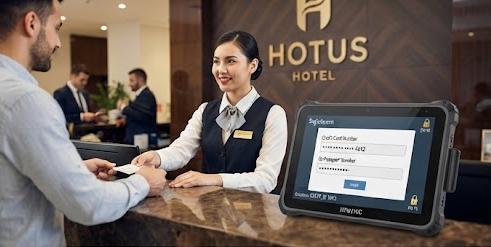
The front-desk pattern above shows the HTNJ10C with the compliance defaults that matter most: masked payment fields on the guest-facing screen and a staff-bound session that closes on idle. What the lobby cannot see is the compliance layer; what it can see is a screen that shows no full card information.
Back Office: Retention and Role-Based Access
The back office holds the longest-lived records in the property, which makes its compliance work about retention and access rather than screen privacy. The Palm-sized miniPC, running the night audit and the housekeeping schedule, is where the property's historical records accumulate, and those records fall under retention rules that a hotel must be able to demonstrate. Configure the miniPC with role-based access so that only the staff who need audit records can reach them, and enable the audit log that records who opened a record and when. Because the back-office machine is often left running overnight for the night audit, set the miniPC to lock after the audit completes rather than sitting open until morning, which closes the largest unattended-data window in the property.
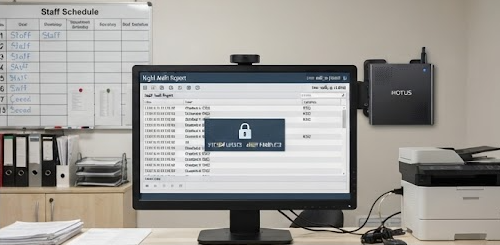
The back-office setup above pairs the Palm-sized miniPC with the two settings that carry its compliance load: role-based access to the audit records and a lock that engages when the night audit finishes. An unattended machine that locks itself is a smaller risk than a machine left open until the morning shift.
☁️ Floors Above Lobby: Sync, Clear, and Remote Wipe
The guest floors are the zone where records move, and mobile records have their own compliance shape. The SH6 carried by housekeeping and room service handles transient records: a room-status change, a service request, or a payment taken at the door. The compliance requirements here are encryption in transit, a wipe path for a lost device, and a clear policy for what the handheld may store between syncs. Configure the SH6 to sync and clear at the staff station rather than accumulating guest records on the device across a shift, and enable remote wipe so a lost handheld does not become a data breach. The same policy that governs the front desk applies to the handheld, but the risk profile is different: a lost SH6 is a mobile risk, while an unlogged front-desk screen is a static one.
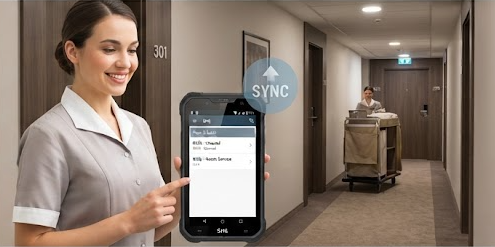
The guest-floor pattern above shows the SH6 in its compliance role: transient records that sync to the property system at the staff station and clear from the device, with remote wipe armed for the day a handheld is lost. Mobile compliance is about the wipe path and the sync rhythm, not just the screen.
Retention Windows That Differ by Zone
Retention rules differ by zone, and the compliance program has to honor the difference. Front-desk records follow the reservation and payment retention windows, which are typically the longest because they are tied to financial records. Back-office audit records follow the property's operational retention schedule, which may be shorter or longer depending on local rules. Guest-floor transient records should be cleared at the shortest interval, because a service request from two weeks ago has no reason to sit on a handheld. The practical rule is to set each zone's retention window at the time of configuration and to review the windows once a year, because the risk is not in having the records but in keeping them longer than the policy allows.
What an Inspector Asks on the Day
When an inspector or a brand auditor visits, the questions are predictable, and a hotel that has configured the three zones properly can answer them from the device settings alone. The inspector asks how guest information is masked at the front desk, how access to audit records is controlled, and what happens if a handheld is lost. The answers are the HTNJ10C's masked display and staff-bound sessions, the Palm-sized miniPC's role-based access and lock-after-audit behavior, and the SH6's sync-and-clear plus remote-wipe configuration. A hotel that can demonstrate those three answers from its own device settings has done most of the compliance work, because the auditor is testing whether the policy exists in the configuration, not in a binder.
| Zone | Device | Compliance focus | Key setting |
|---|---|---|---|
| Front desk | HTNJ10C | Screen privacy, staff traceability | Masked payment fields, session timeout |
| Back office | Palm-sized miniPC | Retention, access control | Role-based access, lock after audit |
| Guest floors | SH6 | Transient records, loss protection | Sync-and-clear, remote wipe |
The table summarizes the three-zone compliance program in one view. Each row names the device, the compliance focus, and the single setting that carries most of the work, so a property manager can walk the three zones and confirm each one is configured before the inspector arrives.
Rolling the Configuration Out in Order
Roll the compliance configuration out in the same order as the guest journey, because that order matches the records' importance. Front desk first, since identity and payment information carry the highest risk and the shortest tolerance for error. Back office second, because the audit trail needs the longest lead time to build correctly. Guest floors third, since the handheld policy is the newest for most properties and benefits from the front-desk and back-office patterns already being in place. Each zone's configuration should be documented in the same handover folder as the device setup, so that a new property manager inherits a working compliance program rather than having to rediscover it. The related hotel front desk and guest room installation guide shows the physical setup that pairs with these compliance settings, and the full rugged handheld tablets range covers the mounting and accessory options that keep each device in its assigned zone.