A regional wind farm operator runs 46 turbines across two ridgelines, and until this spring every maintenance visit produced the same artifact: a clipboard sheet that rode up and down the tower in a technician's jacket pocket. The sheet worked until it rained, until gloved hands made handwriting unreadable, and until two crews filled in the same nacelle visit with conflicting numbers. The operator's O&M lead asked for something narrower than a fleet-management platform: three record types, three devices, and one rule about which device owns which record. This case follows how the crew assigned the energy and utility inspection workload across a Windows tablet, an Android 5G tablet, and a handheld terminal — and what changed in the first month of running the split.
The problem was never a shortage of data. Technicians photographed yaw drives, torque wrenches, and blade bolt rows constantly; the failure was that those photos lived in phone galleries while the official record stayed on paper. Reconciliation happened weekly, in an office, from memory. The operator wanted the record and the evidence to land in the same place at the moment of capture, without asking technicians to learn a new system at the top of a ladder.
🔍 The Customer and the Batch Sheet Problem
The operator's maintenance cycle runs on two rhythms. Scheduled visits happen every sixty days per turbine and produce a fixed checklist: yaw brake gap, pitch motor current, gearbox oil level, generator winding temperature, and a bolt-torque sample. Unscheduled visits follow grid faults or vibration alerts and produce a free-form account of what was found. The paper sheet handled the first rhythm well and the second badly, because free-form accounts were where handwriting failed and where the two-crew conflicts concentrated. Before the device split, roughly one visit in five needed a call-back to the technician for clarification, and the O&M office could not tell which turbines had complete evidence trails without opening every folder by hand.
The fix the operator chose was deliberately unglamorous: keep the checklist, kill the clipboard. Each record type would move to the device whose hardware matched the environment it is captured in. The next three sections walk through each assignment as the crew actually runs it.
Nacelle Logs Live on the Windows Tablet
Inside the nacelle, the record is dense and reference-heavy. Technicians compare live readings against nameplate values, previous visit logs, and torque tables that change by bolt class. That comparison work is why the nacelle log moved to the ST11-J rugged tablet, a 10.1-inch Windows machine that opens the same spreadsheet and PDF toolset the office already uses, with no file conversion step between the tower and the desk. The Intel Celeron N5100 quad-core processor handles the crew's torque tables and inspection workbook without a spin-up wait, and the 1200 x 1920 IPS panel at 420 to 450 nits stays readable under nacelle service lighting.

The environment decided the rest. Nacelle work means metal dust, cold mornings, and gloved hands on a touchscreen, and the ST11-J carries an IP65 enclosure with MIL-STD-810G certification, a 1.2 meter drop rating, and wet-hand touch support. Its 7.6V 6000mAh battery is removable, so a technician starting a second turbine after lunch swaps packs instead of hunting for an outlet; the crew budgets roughly eight and a half hours of continuous runtime per charged pack and carries one spare per tower bag. Readings get typed directly into the workbook row for that turbine, photos are attached to the same row, and the file syncs when the tablet rejoins the site network at the tower base — nothing is retyped at the office.
⚡ Ground Checks Ride the 5G Tablet
The second record type is everything captured at ground level: tower-base cabinet checks, padmount transformer readings, fence and road conditions, and the vibration-alert walkdowns that follow a grid fault. This is the record that most often needed to reach the control room while the crew was still on site, which is why it moved to the RT80 5G rugged tablet. The UNISOC octa-core 2.7GHz platform with a built-in 8T NPU runs the operator's inspection app comfortably, and the 5G SA/NSA dual-mode modem uploads a completed ground checklist from the field in seconds instead of waiting for the crew to return to the depot.
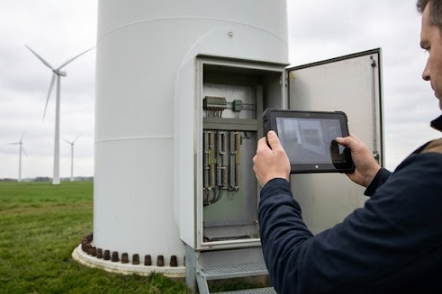
The RT80 earns its place on the ground crew in three specifics. First, its 48MP rear camera produces blade-edge and cabinet-label photos that stay legible when zoomed for review. Second, independent Beidou plus RTK positioning tags each ground reading with coordinates precise enough to settle disputes about which padmount was measured. Third, the IP67 enclosure and 10000mAh battery with Power Delivery fast charging handle the rain-and-mud half of the job; a tablet left charging over the crew's lunch break is full again for the afternoon ridge. The 251 x 170 x 14.6mm body at under 650 grams is light enough that technicians stopped leaving it in the truck, which the O&M lead counts as the quiet win of the whole deployment.
Serial Numbers Belong to the Handheld
The third record type is parts and identity: replacement yaw motor serials, blade bolt batch numbers, filter part codes, and the crate-verification step when a service truck arrives with a pallet of spares. This work never needs a large screen, and it happens with one hand while the other holds a part — which is why it moved to the U9000 handheld PDA. Its optional 2D imager reads crate labels and bolt-batch barcodes from gloved, wet-handed grips, and the optional UHF RFID module reads asset tags beyond 1.5 meters, compliant with EPCglobal Class 1 Gen 2, so a technician can confirm a rack of tagged spares without pulling each box.
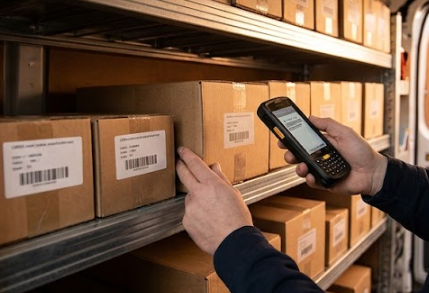
The 5-inch Gorilla Glass display is exactly large enough to show the scanned part against the work-order line it is supposed to satisfy, and the Android 9.0 build with a Cortex-A53 quad-core 2.0GHz processor runs the scanning app all day without a reboot. The 3.7V 4800mAh removable battery carries the spec the crew cares most about: more than 12 hours of working time and over 350 hours of standby, with a full recharge in under 4 hours overnight on the truck. At 178 x 78 x 24mm, it rides in a jacket pocket up the tower, which is the entire point: serial capture now happens where the serial is, not back at the van from memory.
🏟️ One Table the Team Now Fills at Shift Close
The operator condensed the device split into a single reference card that lives in every crew truck:
| Record point | Device that owns it | What gets captured | What decided the choice |
|---|---|---|---|
| Nacelle inspection log | ST11-J Windows tablet | Checklist rows, torque tables, photos against nameplate values | Windows file compatibility at the point of capture; IP65 and removable battery for nacelle conditions |
| Ground and tower-base checks | RT80 5G tablet | Cabinet readings, walkdown photos, GPS-tagged findings | 5G upload from the field; 48MP camera; Beidou and RTK positioning; IP67 for weather |
| Parts and serial verification | U9000 handheld PDA | Barcode and RFID scans tied to work-order lines | One-handed scanning; UHF tag reads beyond 1.5m; 12-hour working battery |
The table is not a hardware ranking; it is an ownership map. Crews who copy this pattern should start from their own record types and only then pick devices, and operators comparing hardware across the market can cross-check the three assignments against field maintenance deployments that follow the same shape.
What the First Month Changed
After thirty days on the split, the operator counted three measurable differences. Call-backs for clarification dropped from roughly one visit in five to two in the whole month, because the evidence photo now sits on the same record row as the reading it explains. The weekly reconciliation meeting in the office shrank from ninety minutes to twenty, since records arrive already structured and GPS-tagged. And the two-crew conflict problem — the original complaint — has not recurred, because a nacelle log and a ground check can no longer be confused with each other when they arrive from different devices with different formats.
The honest costs are worth stating too. Technicians needed two visits to stop reaching for the jacket pocket where the clipboard used to live, and the office had to accept that records now arrive throughout the day rather than in one evening batch. The U9000's protection rating is not published on its product page, so the crew treats it as a pocket instrument rather than a rain-duty device and keeps wet-weather scanning on the RT80 — a boundary the team set from the spec sheet rather than from an accident.
🔮 Where the Same Kit Fits Next
The operator's next request is already in motion: extending the same three-device split to the solar string-inspection crew it shares depot space with, on the argument that record ownership by environment transfers better than any single-device compromise. Sites evaluating rugged hardware for similar splits can browse the full rugged product line and match each record type to a device class the same way — and the fastest sanity check is to ask which records must be captured with one hand, which must leave the field immediately, and which must open in the office formats the desk already runs.