ST13-J, SH6 and ST11-U: How Thin Client Hardware Left the Desk
Most conversations about virtual desktops spend their time on the server side. Central image management, profile handling, licensing — all of it matters, and none of it has changed much in a decade. What has changed is the thing sitting at the other end, and it has changed more than the people specifying it usually notice.
The endpoint went through three recognisable stages. The first shrank a desktop until it fit in a smaller box. The second removed the box entirely and left a small sealed unit. The third stopped treating the endpoint as furniture at all. The three machines below sit in that third stage, at three different screen sizes, and the dedicated thin client VDI solutions in use today only make sense once you see why the shape kept moving.
The Three Generations of a Virtual Endpoint
Each generation solved the problem the previous one created. Shrinking the machine made it fit under a monitor but left it tethered to a desk. Removing the local disk made it manageable at scale but kept the tether. Only when the endpoint stopped being something installed did the constraint finally move from the machine to the person carrying it.
That shift is worth stating plainly because it changes what a specification is for. In the first two generations the question was what the device could do. In the third the question is where the work actually happens, and whether the device can be there when it does.
Generation One: Shrinking the Box
The first stage was physical compression. A full desktop became a small box that mounted behind a screen, which solved space problems in reception desks, clinics and trading floors. The compromise was that nothing about the working model changed. The machine still lived at a fixed point, still needed a monitor and a keyboard, and still belonged to a location rather than a person.
It was a genuinely useful step for sites with a fixed workstation per employee. It was no help at all for anyone whose job moved.
Generation Two: Removing the Box
The second stage removed local storage and local state, leaving a sealed unit that boots an image from the network. Support costs fell because there was nothing on the device to break or update individually, and a failed unit could be swapped in minutes. The trade was that the endpoint now depended on a working network at a fixed location, and the cable became the defining feature.
Everything about this stage assumed the user would come to the device. For office work that assumption held for years.
Generation Three: Making It Something You Carry
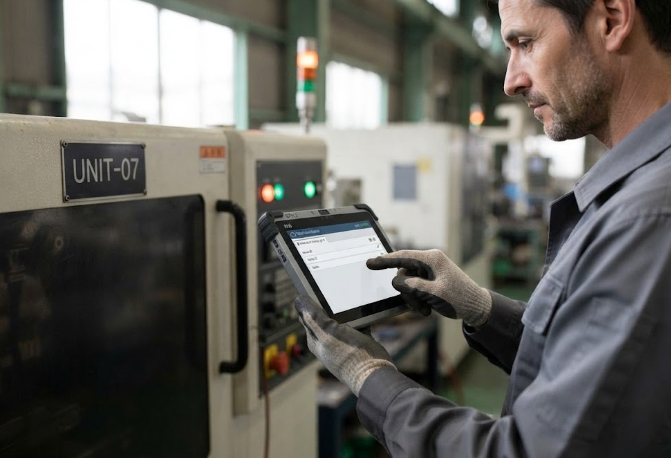
The third stage is where the assumption breaks. Once the desktop image lives centrally, the endpoint does not need to be large, does not need a local disk, and no longer needs to stay in one place. A rugged Windows tablet running a thin client session is still a thin client — it simply is not installed anywhere. The whole line of our rugged tablet range exists at that intersection: centrally managed, locally portable, and built to survive the places a sealed office unit was never designed for.
What drove it was not a technical breakthrough but a change in who uses virtual desktops. Warehouse supervisors, field engineers, ward rounds and factory floor leads all needed the same centrally managed desktop, and none of them sit at a desk to get it.
🖥️ What Each Screen Size Is Actually For
The three sizes below are not a ladder of better and worse. They answer three different jobs, and the useful question is which job the rollout is actually for.
ST13-J is the large one at 13.3 inches, and it behaves like a portable workstation rather than a handheld. It runs an Intel Celeron N5100 quad-core with 8GB of memory and 256GB of storage, carries an 8000mAh battery, and holds an IP65 rating at around 1450 grams. That weight is the point: this is the unit for a fixed post that occasionally has to move, such as a control room position that also covers a walk-round, rather than something carried all day.

ST11-U is the middle size at 10.1 inches and the one most rollouts settle on. It steps up to an Intel i5-1235U or i7-1255U with configurations from 8GB+128GB to 64GB+512GB, runs a 10.1 inch IPS panel rated for sunlight readability, and carries a 6000mAh battery at roughly 1190 grams. It is the size that stays readable while standing and still fits in a work bag.

SH6 is the small one at 6.5 inches, built for one hand and short sessions. It runs an Intel N100 quad-core with 8GB and 256GB, a 6.5 inch HD+ panel at 380 nits, and a 5000mAh battery that gives it about 4.5 hours of working time. The battery figure is deliberate: this is a device for looking something up and moving on, not for sitting down with.
💰 A Comparison for Deployment Planners
| Model | Screen | Processor | Memory and storage | Battery | Ingress rating | Typical role |
|---|---|---|---|---|---|---|
| ST13-J | 13.3 inch | Intel Celeron N5100 quad-core | 8GB / 256GB | 8000mAh | IP65 | Mobile workstation at a semi-fixed post |
| ST11-U | 10.1 inch IPS | Intel i5-1235U or i7-1255U | 8GB+128GB to 64GB+512GB | 6000mAh | IP65 | General mobile endpoint for most rollouts |
| SH6 | 6.5 inch HD+ | Intel N100 quad-core | 8GB / 256GB | 5000mAh, about 4.5 hours | IP65 | One-handed lookups and short sessions |
Read the battery column as the honest constraint. A device built for short sessions will not cover a full shift, and sizing a rollout around the smallest unit tends to be the decision that gets revisited first.
What Changes Operationally, Not Technically
The technical stack is the same as it was in the second generation. What changes is asset management. Devices that live in a building can be counted by walking a floor. Devices that live with people have to be tracked by assignment, and a lost unit is now a security question rather than a hardware cost, because what walked away was a session and not a disk.
The other operational shift is damage. A sealed office endpoint had one failure mode, which was electronic. A carried endpoint also gets dropped, rained on and left in a van overnight, which is why the IP65 rating matters more than any performance figure on these three.
🔮 Where the Next Step Probably Lands
The likely direction is further specialisation rather than further shrinking. A screen size chosen for the job, a mount or grip chosen for the task, and a hardware platform standardised behind all of it. Sites with unusual requirements — an embedded mount, a specific port set, a fixed configuration across a fleet — usually find the standard catalogue almost fits, and OEM and ODM programs exist for the remaining gap.
The pattern across all three generations has been the same. The endpoint gets smaller and more portable, and the managing stays central. The only real question is how far the desk can be left behind before the device has to be redesigned again.