The most expensive photograph in a factory is the one the quality clerk swears she took. The defect was real, the shot was framed, the five-element rule from the site's own checklist was followed — part number in view, gauge reading visible, location tag in frame. And yet when the customer audit opens the MES defect register, the entry has no image attached, the rework order stands unverified, and the clerk is defending her word against a database. Almost every one of these incidents traces back to one of three places between the camera and the record, and the fastest way to stop them is to know which place you are standing in. This article walks those three places with the three tablets a quality line actually deploys, because the fix is different for each.
Three Places a Shot Stops on Its Way to the Audit
Every vanished defect image fails in one of three segments. Segment one is the device: the photo was never written to storage, or it was written somewhere nobody looks. Segment two is the network: the file exists but the upload died inside a dead zone, silently, in a part of the plant where nobody watches progress bars. Segment three is the system: the upload arrived, but the record platform rejected it or filed it against the wrong work order, and the image sits in a queue nobody audits. The reason these three are worth separating is that each fails differently in the field — and each has a ten-second check that tells you which segment you are troubleshooting before anyone starts re-imaging a tablet that was never broken.
The fleet at this plant is split accordingly, drawing from the same rugged tablet lineup so that spares and docks stay interchangeable. A wired bench unit handles the final inspection stations, a rugged mobile unit roams the spray line and the finishing cells, and a cellular-capable unit covers the yard and the warehouses where the plant's Wi-Fi was never extended. Each unit carries a different failure profile, which is exactly what makes the triage work.
When the Camera Roll Is the First Witness
Segment one ends in seconds with one question: is the photo in the camera roll? If it is not, the fault lives on the device, and the usual culprits are a full drive, a camera app killed mid-write by a low-battery shutdown, or a storage policy that pushes shots to a folder the upload app never reads. The unit stationed at the final inspection bench is the ST11-M, and its published storage options matter more here than its processor: 256 GB standard with 512 GB and 1 TB optional, running Windows 10 Pro on an Intel i5-8200Y at 1.30 GHz with turbo up to 3.90 GHz. A 256 GB drive that also holds the offline work-instruction PDFs and last quarter's video training files fills faster than the desk assumes, and a drive that fills during a shift produces exactly the silent mid-write failure that makes a photo vanish without an error dialog.
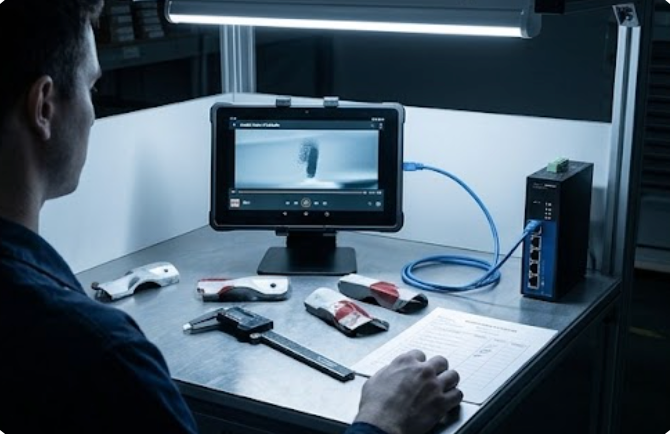
The same bench unit is where the network question gets answered differently, because it is the one tablet on the line with a published RJ45 port in its interface list — alongside HDMI, USB 3.0 ×2, RS232, and a bottom Pogo-pin. When the bench uploads stall, plugging the tablet into the plant's wired drop removes segment two from the equation entirely: if the photo uploads over Ethernet and not over Wi-Fi, the fault was never the tablet. Its published 6000 mAh 7.6 V battery — rated at roughly 7 hours 30 minutes of usage and about 4 days standby, with a ~4 hour charge — covers a full shift at the bench, and the 10.1-inch 1200 × 1920 panel at 430 nits typical (450 nits max, with a 1000-nit option) keeps the defect framed correctly the first time, which is its own contribution to the record: a photo that has to be retaken is a photo that twice risks the dead zone.
The Wi-Fi Dead Zone Behind the Paint Line
Segment two is the harder one, because nothing errors. The clerk frames the shot, taps upload, sees the spinner, pockets the tablet, and walks on — the queue retries silently, the shift ends, and the image dies in a directory of unsent files. The zone where this happens most is the finishing side of the plant: behind the paint line, inside the curing ovens' metal enclosures, and across the racking in the warehouse annex, all places where 2.4 GHz interference from curing equipment and shelf steel tears the coverage apart. The roaming unit assigned to those zones is the HTNJ10C, and the first published spec to note is Wi-Fi 6 with Bluetooth 5.0 — a radio generation whose channel and roaming behavior behaves measurably better in congested plants than the older 802.11ac units on the same floor plan.

The body is built for the zone, too: IP67 dustproof and waterproof, MIL-STD-810G certified with 1.22 m drop resistance, and an operating range of −20 °C to 55 °C, which covers the cure oven approach where ambient heat rules out lesser tablets. The camera pair — a 5 MP front unit and an 8 MP rear autofocus camera with LED flashlight — is where the zone's other problem gets solved: paint-line lighting is tuned for the product, not for the clerk, and the published LED flash is often the difference between a gauge reading that survives the audit and one that does not. The 10.1-inch display runs at 1200 × 1920 with 560 nits of brightness and 7H glass hardness, readable over the spray booth's glow. Its 7.6 V 3500 mAh battery is removable — the published sheet does not state a usage-hours figure, so the bench keeps a charged spare in the dock rather than quoting an endurance number — and the power side runs from a 100–240 V AC adapter at DC 19 V 3.42 A. The honest gap stays honest: this model publishes "high-speed RAM plus SSD storage with M.2 extension" without capacity figures, so capacity planning for it happens at order time, not from a datasheet.
When the MES Says Nothing Came In
Segment three is the one that humiliates IT, because the device and the network are both fine. The photo uploaded — the tablet's queue says so — and the record platform never shows it. Either the file was rejected at the gateway for size or format, the work-order association was wrong because the clerk scanned the previous job's barcode, or the integration service batches uploads and the batch failed overnight with nobody watching the retry log. The unit that makes this segment visible instead of mysterious is the ST11-J, the yard-and-warehouse machine that cannot lean on the plant's Wi-Fi at all: its published connectivity is 802.11a/b/g/n/ac with Bluetooth 4.2 on the Realtek 8822CE module, plus 4G LTE through the SLM770A modem (EC25-AUX in North America). When a Wi-Fi upload vanishes, switching the unit to cellular and re-sending splits the problem in half — if the same file arrives over LTE, the gateway and the record platform both just exonerated themselves, and the fault is provably inside the plant network.

The published platform under that diagnosis work is an Intel Celeron N5100 quad-core at 1.10 GHz, turbo to 2.80 GHz, with 8 GB RAM and 256 GB storage (128 GB and 512 GB optional), Windows 10 Pro or 11 Pro, and the same 10.1-inch 1200 × 1920 IPS panel as its siblings at 420 nits typical. Its 6000 mAh 7.6 V battery is published at roughly 8 hours 30 minutes of usage — the longest quoted figure of the three, appropriate for the unit whose rounds take it outdoors — and positioning comes from GPS, BDS, and GLONASS, which stamps yard defect photos with a location the record can verify. The published dimensions are 268.9 × 176.8 × 18 mm at 1150 ± 50 g, and the options list carries TPM 2.0, a barcode scanner, UHF RFID, fingerprint reader, and a docking solution for the depot charge.
What Each Tablet Puts in the Field Kit
Side by side, the published sheets behind the three segments read like this — only rows all three models publish are tabulated, and everything else stays in the sections above:
| Row | ST11-M | HTNJ10C | ST11-J |
|---|---|---|---|
| Operating system | Windows 10 Pro (11 Pro optional) | Windows 10 Pro / 11 Pro | Windows 10 Pro / 11 Pro |
| Processor | Intel i5-8200Y, 1.30 GHz, turbo 3.90 GHz | Intel N100 quad-core, burst 3.4 GHz | Intel Celeron N5100, 1.10 GHz, turbo 2.80 GHz |
| Display | 10.1" 1200 × 1920, 430 nits typ (450 max, 1000 optional) | 10.1" 1200 × 1920, 560 nits, 7H glass | 10.1" 1200 × 1920, 420 nits typ (450 max, 1000 optional) |
| Camera | Front 5 MP, rear 13 MP | Front 5 MP, rear 8 MP AF + LED flash | Front 5 MP, rear 13 MP |
| Battery | 6000 mAh / 7.6 V (~7 h 30 min usage) | 3500 mAh / 7.6 V, removable | 6000 mAh / 7.6 V (~8 h 30 min usage) |
| Wireless | 802.11a/b/g/n/ac + BT 4.2, 4G LTE (SLM770A) | Wi-Fi 6 + BT 5.0, global 4G LTE | 802.11a/b/g/n/ac + BT 4.2 (Realtek 8822CE), 4G LTE |
| Notable ports | RJ45, RS232, HDMI, USB 3.0 ×2, Pogo-pin | RJ45, Mini HDMI, USB-A, USB-C, 12-pin Pogo | Docking option; NFC 13.56 MHz |
Storage capacity for the HTNJ10C and protection ratings for the ST11-M and ST11-J are not published on their respective sheets, so they appear in neither the table nor the text as inferred numbers. The full rugged-tablet families behind these three posts sit under the Hotus product line, which is where a plant sizing a segmented fleet usually starts.
Ten Seconds at the Bench: The Triage Order That Works
The diagnosis that used to eat an afternoon now follows a fixed ten-second order. One: open the camera roll — if the shot is missing, stop, the fault is device-side, and no amount of router reconfiguration will find it. Two: if the shot exists, open the upload queue — a file sitting in "unsent" is a network event, and the next question is only which zone the clerk was standing in. Three: if the queue shows "sent" but the record shows nothing, the fault is system-side, and the re-send over cellular from the yard unit is the cleanest split test in the building. The order matters because it moves from the cheapest check to the most expensive, and because each step produces evidence the next step can use. Plants that train the triage order report the same shift in behavior: the quality clerk stops apologizing for missing photos and starts stating which of the three segments failed, which is the difference between a mystery and a maintenance ticket. Plants that want to see how these rugged tablets stack up against competing devices before standardizing a fleet will find the side-by-side numbers in product comparisons and competitor analysis more useful than any single datasheet.
Who Owns Which Failure at Shift Handover
The triage order only holds if each segment has an owner. Device-side failures belong to the quality clerk's line lead: a full 256 GB bench drive is a storage-hygiene problem with a weekly five-minute fix, and it should never reach IT. Network-side failures belong to the plant's infrastructure team, and the dead-zone map behind the paint line — annotated with the exact curing-oven enclosures where uploads die — is the document that turns recurring complaints into a scheduled access-point project. System-side failures belong to the MES integration owner, whose overnight batch retry log is the first thing to read when the morning audit finds images the tablets claim were sent. At handover, the outgoing shift passes one sentence per segment: camera roll clean, dead zone two incidents, gateway batch green. When any of those three sentences goes unspoken, the vanished photo returns — not because the hardware failed, but because nobody was assigned to notice.