A concourse file rarely stays closed for long. Earlier in the season we wrote up a morning when a corridor panel missed its playlist window and the case ended at the scheduler. This note is the second card from the same building: a different incident, a different crew, and a fault that sits one layer lower than content delivery. The desk saw a blank panel. The panel, it turned out, was awake the whole time and showing its own menu. Between those two sentences sat a port table, a walking round, and a rack machine that had been answering queries all morning without being asked for an opinion.
The equipment on this card is not the set from the first case. During the autumn refit the control desk was given a dedicated terminal, the walking round moved to a different tablet, and only the rack machine carried over. That turnover is worth writing down because the Hotus Smart Hardware Products Manufacturer Catalog spans more than one operating system and more than one screen size, and a site that mixes them needs a reason for each choice. The reasons on this site are specific, and they are the part a second site can actually copy.
The Second Card in the Concourse File
The first case from this building ended with a schedule window and a heartbeat log. The crew remembers it, and that memory changed how the second card was opened. This time the front desk did not write BLANK and stop. The duty sheet carried a qualifier in the same line: picture absent, backlight present, no other panel affected. Whoever took the call had learned that a panel reporting nothing is not the same as a panel that is off, and the distinction is the whole case.
It also explains why this card reads differently from the last one. The earlier incident produced three sentences that disagreed about one event. This one produces observations that agree with each other and still point at three different layers, because a source-selection fault leaves evidence at the desk, at the glass, and in the rack simultaneously. None of the three owners had the full answer, and none of them needed it. Each wrote what their position could actually see, and the file closed before the afternoon shift.
What the Port Table Said at 09:15
The first entry came from the control desk at 09:15, forty-five minutes into trading. The desk terminal displays a port list for the building's players: ten rows, each with a link state and a recent activity tag. On this morning, nine rows read the way they always do. The row for the east concourse sat at Idle, tagged with an activity word that meant the player had been seen recently but had not been assigned anything new. A desk that only watches content would have called this a player fault. A desk that reads the whole column noticed something quieter: the row was not dead, it was waiting.
That distinction has a cost side to it, and it is not a small one. A row that reads Idle after an opening window points at allocation; a row that reads None or missing points at the player or the cable run. Dispatching an engineer with a spare unit to an allocation problem wastes the spare and teaches the crew nothing. Dispatching a spare to a dead row is correct and fast. We have written before about the cost arithmetic of a screen that stays dark, in RT81, ST11-U and SH5-W: The Cost Chain Behind One Dark Signage Screen, a separate file about a different building, and the arithmetic there was driven by exactly this confusion. The desk on this site keeps the two shapes apart because the terminal makes the whole column visible at once, not one row on request.
Which Layer Owns the Symptom
Before the engineer left the desk, the file got its second line: the layer question. The table below is the version we would hand to a new supervisor. It is not a comparison of devices; it is a comparison of what each observation is allowed to claim, and it was filled in from real rows on this card rather than from a manual.
| What was observed | Layer that owns it | First check | What it is not |
|---|---|---|---|
| Port row at Idle after the opening window | Allocation | Whether a playlist slot was assigned for the morning | A player or cable fault |
| Backlight on, no picture, own menu reachable | Input selection | The panel's source menu, input one against input two | A dead panel |
| Log reads device alive, window pending | Schedule | The allocation cycle, not the machine | A hardware failure in the rack |
| A whole bank of panels dark at once | Distribution | The board feeding that bank | Seven separate failures |
The second row is the one that decided this case, and it is the row most often skipped. When a panel answers its own menu, it is powered, it is rendering, and it is listening for a source. Whatever is wrong lives between the source and the screen, not inside either box. We keep a running note of how pages describe these behaviours, and the spec sheets behind Hotus Product Comparisons & Technical Insights are written for readers who have to make this layer call before lunch. A rating never makes the call; the menu test does.
Why the Control Desk Kept an HTYJ08A Within Reach
HTYJ08A Outdoor Industrial Rugged Tablet is the unit that lives at the desk, and the refit chose it for unglamorous reasons. Its page publishes an 8-inch 1200 x 1920 IPS panel at 560nits with 7H glass, an Intel Core 10th generation i5-10210Y or i7-10510Y processor, Windows 10 Pro or 11 Pro, IP67 protection with MIL-STD-810G certification and a 1.22m drop rating, a removable 7.6V 3500mAh battery, and a full-size port set that includes built-in RJ45 Ethernet alongside USB Type-A and Type-C, Mini HDMI, and a 12Pin Pogo-pin connector. The page lists the gross weight at approximately 1.8KG, packaging included, and the desk unit never moves far enough for that to matter.
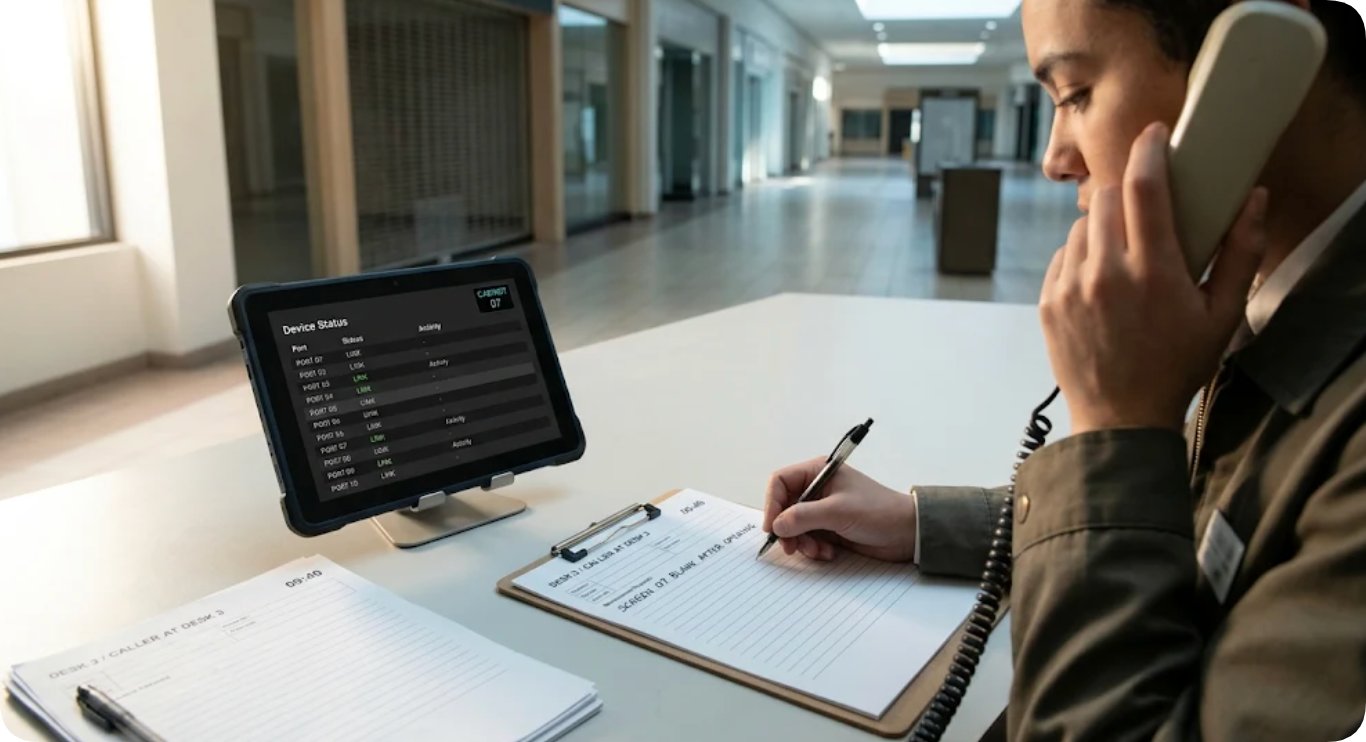
The RJ45 port is the reason this unit sits at the desk rather than in a drawer. The port list that opened this case is read over a wired drop, because a desk terminal that depends on the same wireless segment it is monitoring cannot distinguish a building fault from its own. Wired, the terminal stays outside the thing it watches. The 560nits panel is the second reason: the concourse glazing throws hard daylight across the desk until mid-morning, and a 400-class panel turns into a mirror at that seat. On the refit day the crew plugged the terminal into the desk drop, confirmed the port list rendered, and moved on; nobody has touched the battery clip since, which is itself a small review of the removable 3500mAh pack.
One page-consistency note, because it changed what the crew writes down. The HTYJ08A page states its protection and processor figures identically in the description block and the specification table, so the crew quotes them freely on the card. The gross weight appears only as an approximated figure with packaging included, so the card says gross and leaves it there. A site that writes 1.8 into a field named net weight will eventually order a wrong-sized case for it, and the fix costs nothing at the point of writing.
HTQ10A Battery Math for an Afternoon of Site Visits
HTQ10A Android Rugged Tablet IP65 Rated is the unit that walks, and the walking round is where the second card earned its keep. Its page publishes a 10.1-inch 1200 x 1920 IPS panel at 400nits behind Gorilla Glass with glove and wet-hand touch, an octa-core processor at up to 2.0GHz on Android 12 with 4GB of RAM and 64GB of storage expandable by microSD, IP67 dust and water protection with MIL-STD-810G certification and a 1.2m drop rating, and a 3.8V 10000mAh removable lithium battery supporting quick swap and fast charging. The page lists the weight at approximately 950g. Note the conventions: the desk page weighs its unit with packaging, this page weighs the bare device, and the two numbers do not belong in one column.
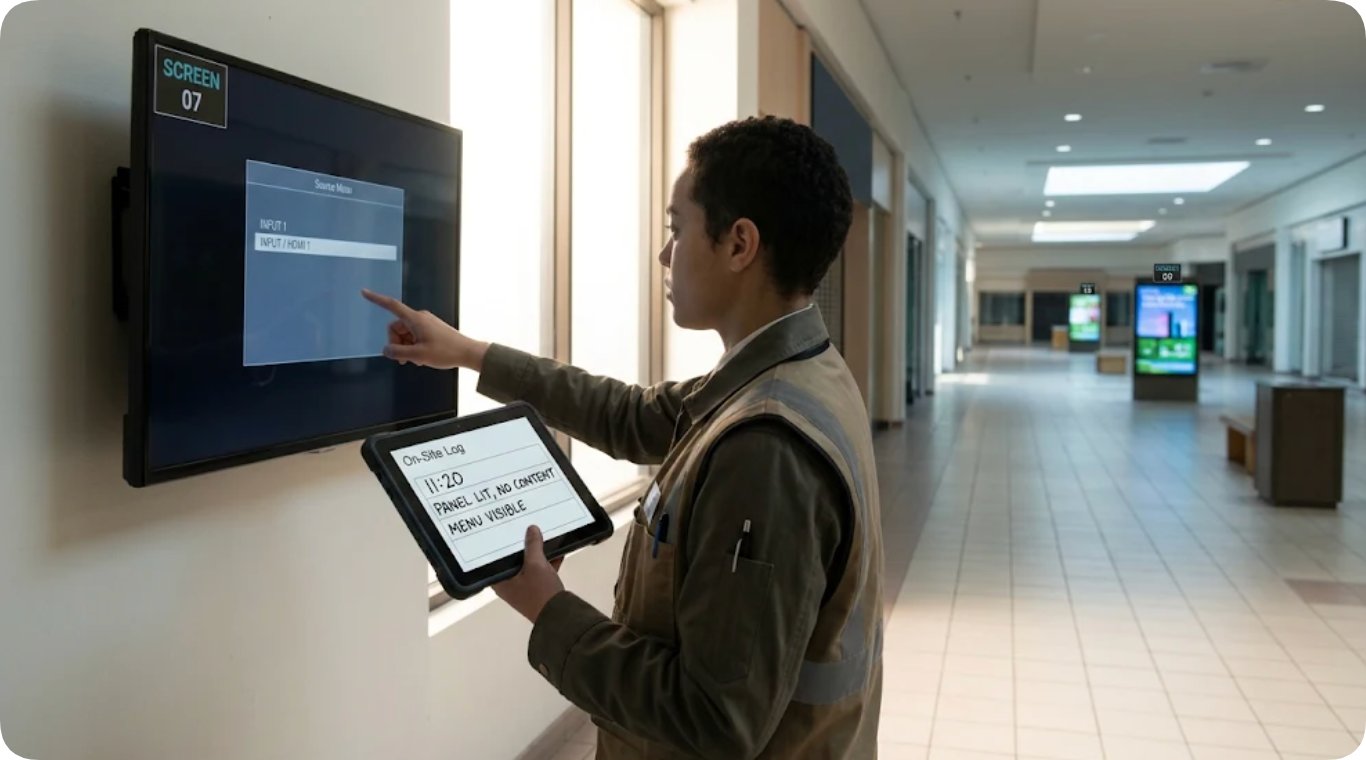
At the east concourse, the walking unit produced the observation that closed the layer question. Standing in front of the panel, the engineer raised the screen's own menu and found the source sitting on an input with nothing connected, one row below the input the player actually uses. The log line went into the tablet at 11:20 with the state of the glass recorded in order: panel lit, no content, menu visible. That is the same panel, the same corridor, and effectively the same minute of the day as the first case, and the resemblance stops there. The first case was a playlist that never arrived; this one was a panel listening on the wrong door. Different layers, different fixes, same glass.
The 10000mAh pack is what makes the afternoon half of the round possible. The walking route covers the concourse, the service corridor and the loading bay, and the engineer does not return to the desk between stops. A swappable pack means the round starts with a fresh cell in the unit and a charged spare in the bag, and the midday state of charge stops being a planning variable. It also means a unit that has been standing on a shelf can be sent out without a wait, which mattered on this card because the walking tablet had been on the charging rack since the previous evening and went straight out at nine.
The Rack That Kept Its Own Answer
WTR PRO AMD Mini PC Router Hardware stayed in the rack for the whole second card, and the crew read it once. The machine's page publishes an AMD Ryzen R3 5450U processor, a single DDR4-3200 slot up to 32GB, dual M.2 NVMe storage, four 3.5-inch SATA bays, dual 2.5G LAN ports, Wi-Fi 6, triple 4K output across HDMI, DP and full-featured Type-C, a 22.8cm x 15cm x 18.5cm chassis on a 120W adaptor. On the first case from this building, that scheduler log settled the file. This time it only confirmed what the desk had already seen, which is the correct order of events and worth spelling out.
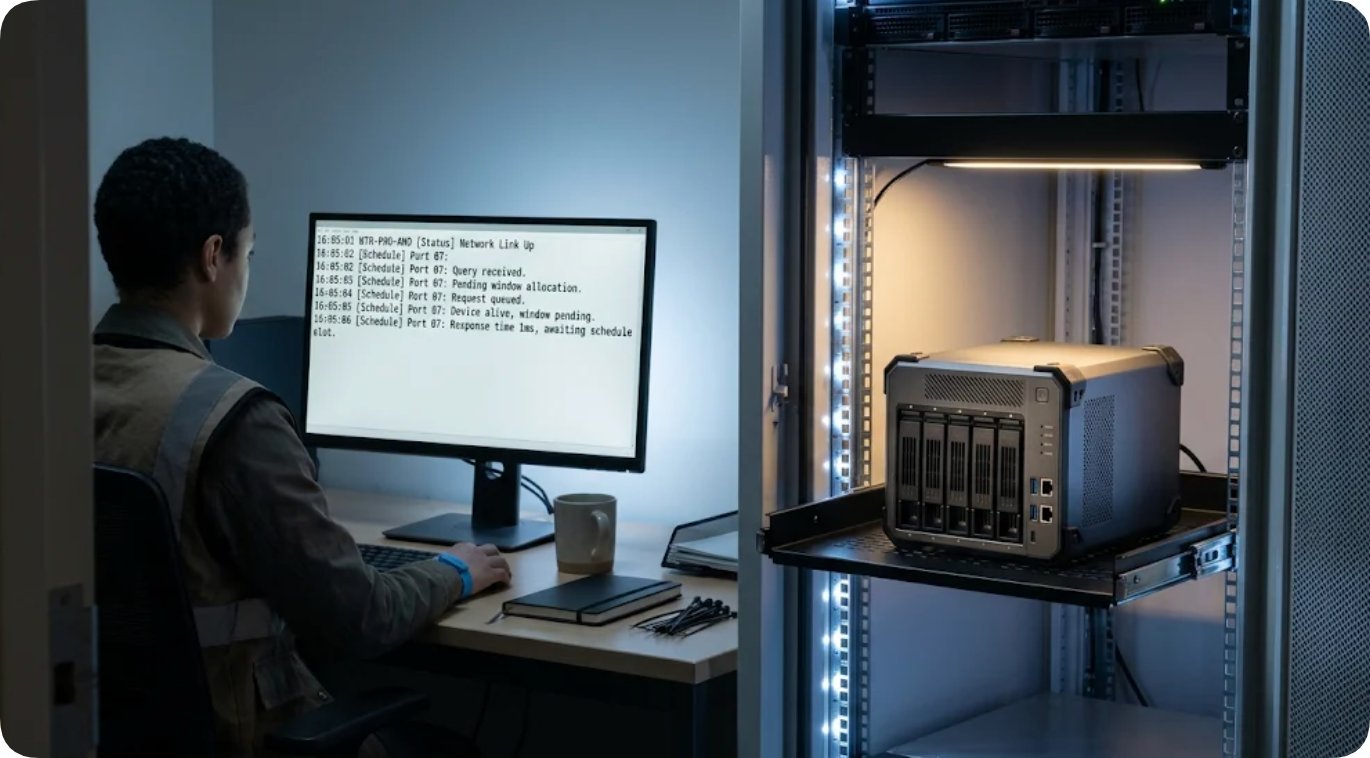
The log line for the east concourse player read the same shape as it always does on a quiet morning: network up, query received, device alive, window pending. Nothing in that line is a fault. A player that answers and waits is a healthy player standing in a queue, and on the first card the queue never emptied because the allocation had been missed. On this card the row sat at Idle because the player had nothing new to receive while the panel it fed was pointed at the wrong input. The machine was describing a healthy link to a screen that was not listening, and only the desk column plus the glass could see both halves of that sentence.
The dual 2.5G LAN ports are the quiet reason this rack machine can sit between two worlds. One port faces the player network and the other faces the desk segment, and the site keeps them separate, so a broadcast storm on the player side cannot take the desk's port list down with it. The four SATA bays hold the rolling content archive, which mattered once in the first case and has mattered twice since for reasons that had nothing to do with signage. The machine is oversized for a pure scheduler, and the site knows it; the bays and the second port are the oversizing, and they are the parts the next site copied.
How the Afternoon Closed the Queue
The fix took one visit and no parts. The engineer switched the panel's source to the live input, watched the picture return, and wrote the closing line against the layer table rather than against the glass: input selection, corrected at source menu, no hardware replaced. The desk row came off Idle at the next allocation cycle on its own, which is the detail worth underlining. Nobody touched the player, the rack, or the cable. A file that had started with the word blank ended with a word about a menu, and the distance between those two words is the difference between a spare unit in a van and a ten-minute stop.
What the site changed afterwards was procedural, and it was one sentence long. Every opening call about a panel now carries the menu answer before the engineer is booked: if the panel raises its own menu, the card goes to the input and allocation columns first. The port table stays on the desk, the walking round stays on the swappable pack, and the rack machine keeps answering queries nobody has to read. For the general version of this split, including where each unit type earns its place on a smaller floor, the published overview lives at Digital Signage Application Solutions, and the layer table above is the part worth carrying across unchanged.
Frequently Asked Questions
1. Does an IP67 rating tell you anything about a panel that shows nothing?
Only by exclusion, and weakly. Ingress damage tends to be permanent and one-sided: a unit that failed through sealing does not raise a crisp menu and hold it. On this card the panel answered its own menu, which placed the fault between the source and the screen. The rating still matters for the walking unit, which gets wiped down daily on a food-adjacent concourse, but it never entered the diagnosis.
2. Why run a Windows terminal at the desk and an Android tablet on the round?
The desk unit exists to render one page reliably over a wired drop, and the site's monitoring dashboard is browser-based, so the HTYJ08A's Windows environment and RJ45 port do that job without adapters. The walking unit lives on its battery and its camera, and the HTQ10A's swappable 10000mAh pack plus glove-friendly touch fits a round that passes loading bays and cold corridors. Neither unit is better; they are scoped to seats.
3. What does a log line reading device alive, window pending actually rule out?
It rules out the machine and, in most setups, the link. A player that answers a query is powered, booted, and attached to the network. What it does not tell you is what the panel at the far end is listening to. That is why the layer table sends an allocation line to the schedule column and a menu answer to the input column, and why this site never lets one log line close a card on its own.
4. Can a smaller site copy this three-unit split?
Scaled, yes, and the seam to cut is the rack. A site with four panels can run the desk terminal and the walking tablet and keep scheduling on the player side, because the layer table does not change with screen count. What should not be cut is the wired drop at the desk and the spare pack in the bag; both exist so that the second observation of the morning is as trustworthy as the first.