Rugged Tablets for Field Video Conferencing
Field teams now join video calls from places no meeting room was designed for: a plant floor, a substation, a delivery van. Three Hotus rugged tablets approach that job from different angles, and matching the device to the call matters more than picking the fastest processor.
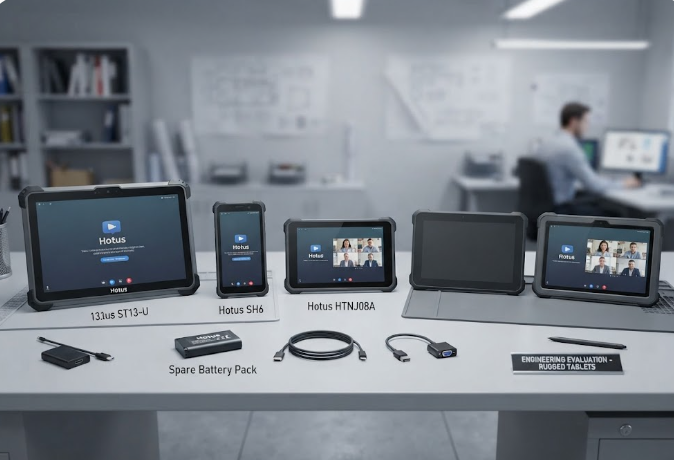
How Hotus ST13-U, SH6 and HTNJ08A Handle Mobile Video Calls
A video call is a chain: camera, microphone, network, screen, battery. Break any link and the call fails regardless of how tough the housing is. Each of these tablets protects a different link. Buyers weighing the category can explore our rugged tablet solutions before settling on one form factor.
What Field Calls Demand from Hardware
Office conferencing advice rarely survives a job site. Uplink stability comes first, because congested site Wi-Fi kills calls. Screen readability at arm's length decides whether three people can watch one device. Shift-long endurance decides whether anyone trusts the tablet by Friday. And physical output options, such as pushing the call onto a monitor or a wired network, rescue the calls that radio cannot carry.
🖥️ Hotus ST13-U: A 13.3-Inch Screen for Site Huddles
The ST13-U is the only device here built for several viewers. Its 13.3-inch IPS panel runs 1920x1080 at 400 or 450 nits, and the 331.7 x 203.2 x 19.5 mm chassis at 1450 g belongs on a desk, dock or vehicle mount rather than in one hand. Windows 11 Pro pairs with a Core i5-1235U or i7-1255U, 8 GB to 32 GB of RAM with a 64 GB ceiling, and 128 GB to 512 GB of storage, which is useful when a supervisor runs the call client, a drawing viewer and a recorder at once. The 8000 mAh pack is the largest here, touch supports stylus and wet-hand input, and connectivity covers Wi-Fi 6, Bluetooth 5.2 and 4G LTE. Cameras are 5 MP front and 8 MP rear, sealing is IP65 with 1.2 m drop resistance, and the operating range spans -20 C to 55 C.
Hotus SH6: One-Handed Calls on Inspection Routes
The SH6 goes the other way. At 178.3 x 83 x 23 mm and 460 g, the 6.5-inch HD+ body is meant for one hand while the other works. Windows 11 Pro ships standard with Home and IoT optional, driven by an Intel N100 quad-core with 8 GB and 256 GB as base and 16 GB with 512 GB optional. The 380-nit panel is the dimmest here, the honest cost of that footprint. Wi-Fi 6, Bluetooth 5.2 and 4G LTE on global bands keep the uplink healthy, while the 5000 mAh battery is rated up to 4.5 hours, the shortest endurance in this group, so long routes need a charging plan. Sealing matches the larger model at IP65 and 1.2 m.
📱 Hotus HTNJ08A: IP67 Sealing with Mini HDMI and RJ45
The HTNJ08A Rugged Tablet is the specialist. Its 8-inch 1200x1920 panel reaches 560 nits behind a 10-point capacitive surface rated 7H, with a Celeron N5100 running four cores at up to 2.8 GHz and a 3500 mAh battery. Two features separate it from everything else here. Sealing is IP67 rather than IP65 with 1.22 m drop resistance, which matters in washdown bays and dust-heavy plants. And the ports include Mini HDMI and RJ45 alongside audio, USB Type-A, USB Type-C, DC in, TF, SIM and a 12-pin pogo connector, so a technician can mirror the call onto a monitor or drop it onto wired network. The trade-off is wireless: Wi-Fi 5 and Bluetooth 4.2, a generation behind its siblings.
RuggON PX501: 5G Uplink and a 1000-Nit Panel
The RuggON PX501 leads on the two specifications where Hotus concedes ground. Its 10.1-inch 1920x1200 panel reaches 1000 nits, roughly double the brightest screen in the Hotus trio, which is a real advantage in direct sun. Core i5-1335UE or i7-1365UE processors pair with 8 GB to 32 GB of DDR5 and up to 1 TB of SSD storage. Cellular includes 5G alongside 4G, with Wi-Fi 6E and Bluetooth 5.3, so uplink headroom exceeds every Hotus model here. IP65 sealing, MIL-STD-810H and MIL-STD-461G certification, 1.5 m drop resistance and hot-swap batteries complete a package generally priced between $599 and $1,700 by configuration.

Winmate M101B: Hot-Swap Batteries for Long Shifts
The Winmate M101B takes the endurance route. A 10.1-inch 1920x1200 panel at 700 nits sits in front of 11th-generation Intel processing with 8 GB of RAM and a 256 GB SSD, with 4G, Wi-Fi 6 and Bluetooth 5.2 for connectivity, IP65 sealing and MIL-STD-810H certification. Hot-swap battery support is the defining feature, removing the downtime that pulls the SH6 or HTNJ08A off a call. Pricing generally runs $1,200 to $2,000, above the Hotus models.
Specification Comparison Across Five Field Tablets
| Model | Display | Platform | Wireless | Power and sealing | Price |
|---|---|---|---|---|---|
| Hotus ST13-U | 13.3" FHD, 400/450 nits | Core i5-1235U or i7-1255U, up to 64 GB | Wi-Fi 6, BT 5.2, 4G | 8000 mAh, IP65 | Not published |
| Hotus SH6 | 6.5" HD+, 380 nits | Intel N100, 8 GB / 256 GB | Wi-Fi 6, BT 5.2, 4G | 5000 mAh 4.5 h, IP65 | Not published |
| Hotus HTNJ08A | 8" 1200x1920, 560 nits | Celeron N5100 2.8 GHz | Wi-Fi 5, BT 4.2, 4G optional | 3500 mAh, IP67 | Not published |
| RuggON PX501 | 10.1" 1920x1200, 1000 nits | Core i5-1335UE or i7-1365UE, 32 GB DDR5 | 5G, Wi-Fi 6E, BT 5.3 | Hot-swap, IP65, 1.5 m | $599-1,700 |
| Winmate M101B | 10.1" 1920x1200, 700 nits | 11th-gen Intel, 8 GB / 256 GB | 4G, Wi-Fi 6, BT 5.2 | Hot-swap, IP65 | $1,200-2,000 |
Where Each Tablet Fits a Video-First Workflow
| Workflow | Best fit | Why |
|---|---|---|
| Command huddle with several viewers | Hotus ST13-U | 13.3" FHD panel, largest battery, dock and vehicle mount options |
| Walking inspection or delivery route | Hotus SH6 | 460 g one-handed body with Wi-Fi 6 and global 4G bands |
| Washdown, heavy dust or wired-only sites | Hotus HTNJ08A | IP67 sealing plus Mini HDMI output and an RJ45 port |
| Outdoor daylight calls | RuggON PX501 | 1000-nit readability and 5G uplink in one 10.1" package |
| Continuous multi-shift operation | Winmate M101B | Hot-swap batteries remove charging downtime between shifts |

⚖️ Choosing Between Screen Size, Sealing and Uptime
The decision collapses to one question: which link in the call breaks first at your site? If nobody can see the screen, the 13.3-inch ST13-U solves it. If the device cannot survive the environment, the IP67-sealed HTNJ08A with Mini HDMI and RJ45 is safer. If people walk while they talk, the 460 g SH6 is the only realistic choice. Where 5G, 1000-nit readability or hot-swap power matters more, the RuggON PX501 and Winmate M101B are legitimate answers, and many organisations deploy two of these profiles side by side. Teams needing a stationary device for the same workflow should review the related mini PC lineup, while more device comparisons cover other categories and scenarios.