I have watched school IT teams buy the wrong device often enough to know the failure is rarely technical. The specification looks fine on paper, the budget clears, and the cart arrives full of slim consumer laptops that were never built for a room full of teenagers, a spilled drink, and a drop onto a tile floor. The real shift I see across districts in 2026 is quieter and more durable: the education computer classroom is moving toward hardware that assumes it will be mishandled, moved, and used for far more than typing an essay. If you are planning a refresh this year, start with rugged tablet solutions designed for education rather than retrofitting consumer gear after the first breakage report.
💡 🏫 Why Schools Need Hardware That Survives Daily Use
The economics of a computer classroom are decided by what survives the school year, not by the sticker price in July. A consumer laptop that fails in month four costs the district a replacement, a loaner, and an IT hour that was already spoken for. Ruggedised units change the maths because they are rated for the exact abuse a school delivers: shared hands, backpacks, cafeteria liquids, and the occasional fall from a desk. When a device is sealed to IP65 or IP67 and tested to a one-metre drop, the breakage line item shrinks from a monthly event to a rare one. For a budget owner, that predictability is worth more than a slightly faster processor.
🖐️ Moving Toward Touch-First Learning Spaces
Paper textbooks are giving way to interactive material, and interactive material demands a surface you can write on. Touch-first learning spaces let a student annotate a diagram, drag a lab simulation, or sign in with a fingerprint without hunting for a mouse. The classroom stops being a row of tiny screens and becomes a shared surface where a teacher can walk over, tap, and redirect a student's thinking in real time. This is less about novelty and more about removing the friction between a question and its answer, which is the entire job of a good lesson.
🖥️ 🖥️ A Large-Screen Station for Teacher-Led Lessons
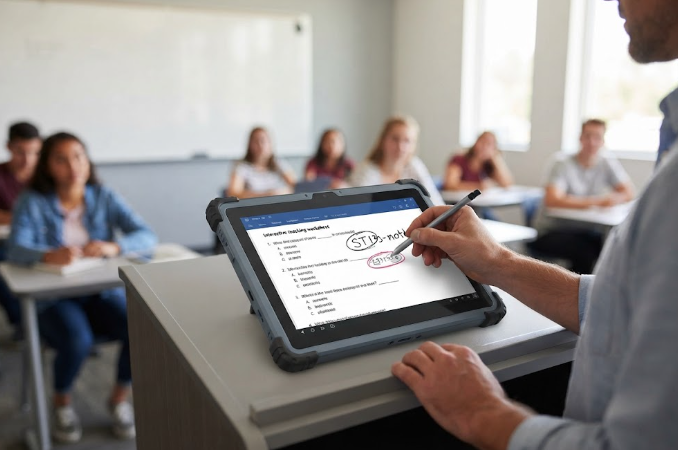
The ST13-J 13.3-inch rugged industrial tablet is the unit I put at the front of a teacher-led room. Its 13.3-inch IPS panel runs 1920 by 1080 and takes ten-point touch along with a stylus, so a teacher can mark up a worksheet live while the class follows. Intel Celeron N5100 silicon with 8 GB of memory and 256 GB of storage is enough to run the learning platform, a browser, and a whiteboard app side by side. An 8000 mAh cell covers a full teaching block, and IP65 sealing with 1.2 metre drop resistance means the cart, the wall mount, or the occasional knock never ends the lesson. At 1450 grams it lives on a desk or a vehicle-style mount rather than in a hand, which is exactly right for a fixed station.
🔋 📱 HTNJ08C: Compact Power for Student Desks
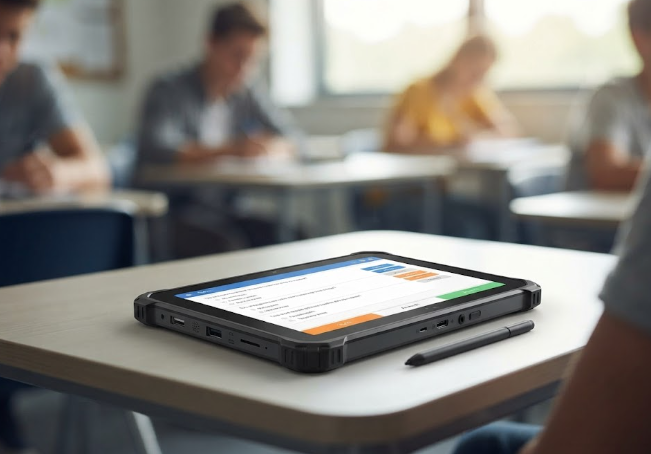
The HTNJ08C rugged tablet is the better fit for the individual student desk. Its 8-inch LCD runs 1200 by 1920 at 560 nits, bright enough to read near a window without dimming the room. An Intel N100 processor with four threads at 3.4 GHz keeps the assessment app and a video call responsive, and the IP67 rating with 1.22 metre drop resistance is the strongest seal of the three for a device that changes hands every period. The port layout is generous for the size, with Mini HDMI, RJ45, SIM, and a POGO pin for a charging dock, so a classroom can share a bank of these between cohorts without a tangle of dongles. At roughly 3500 mAh it is built for a lesson block returned to a dock, not an all-day carry.
✋ A Pocket-Sized 8-Inch Option for Mobile Tasks
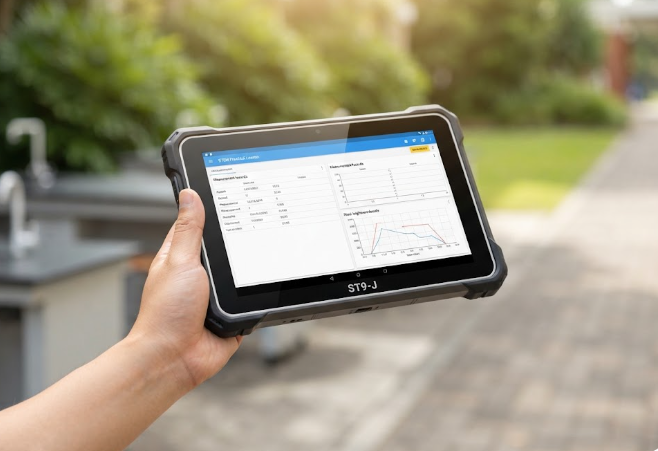
The ST9-J 8-inch rugged industrial tablet earns its place when learning leaves the desk. STEM fieldwork, campus inventory, and outdoor measurement all want a screen that fits one hand and survives the weather. The 8-inch IPS panel mirrors the HTNJ08C resolution but adds an optional 1000-nit mode for direct sunlight, and it carries MIL-STD-810G on top of IP65, the only one of the three with that military-grade drop and vibration certification. A 5000 mAh battery pushes past seven hours, and optional UHF RFID, a scanner, or a fingerprint module turn a simple viewer into a data-capture tool for science and logistics electives.
📊 Specs That Map to Real Learning Needs
The table below is the one I hand to a procurement committee before anyone quotes a number. It is organised by role rather than by price, because in a school the role decides the spec.
| Model | Display | Processor | Sealing | Battery | Best education role |
|---|---|---|---|---|---|
| ST13-J | 13.3" IPS 1920×1080 | Intel Celeron N5100 | IP65, 1.2 m drop | 8000 mAh | Teacher station, fixed labs |
| HTNJ08C | 8" LCD 1200×1920 560 nit | Intel N100 4T 3.4 GHz | IP67, 1.22 m drop | 3500 mAh | Student desk, shared bank |
| ST9-J | 8" IPS 1200×1920 | Intel Celeron N5100 | IP65, MIL-STD-810G | 5000 mAh | Fieldwork, STEM tasks |
💰 🔧 Fleet Deployment at Scale
A refresh is easy to approve and hard to run. The districts that succeed treat the devices as a managed fleet from day one: a charging dock per bank, a standard Windows image, and a spare pool sized to the failure you still expect. Because all three units run Windows, the same policies, filters, and update rings already used for desktop PCs apply without a second management console. That uniformity is the quiet advantage of staying on one operating system across a computer classroom, and the full rugged handheld tablets line is built to slot into that existing workflow rather than fight it.
🔮 What Comes After 2026
The trend line is clear. Schools are no longer asking whether a device is tough enough; they are asking how toughness, battery life, and manageability combine into a lower cost per student hour. Expect more 8-inch units in shared banks, more large panels at the front of the room, and more field-ready 1000-nit screens for project-based learning that refuses to stay indoors. The districts that get there first will have fewer broken devices, fewer help-desk tickets, and more time spent on teaching. For practical upkeep once the fleet lands, our guide to keeping educational rugged tablets classroom-ready covers the routines that protect the investment through a full academic year.