Every industrial edge comparison I have been pulled into eventually stops being about processors. It turns on where the device physically sits, what it has to talk to, and how long the screen has to survive in a cabinet that runs warm all summer. Buyers arrive with a specification spreadsheet and leave with a shortlist built on four much plainer questions. This is that comparison, run across three very different answers: a conventional rugged tablet in the HTYJ10A, a hands-free option in AR Smart Glasses, and an Android-based rugged tablet in the HTQ10A.
📦 What Buyers Line Up Side by Side
The first thing worth saying is that the spreadsheet rarely decides anything. Processor, memory, and storage are close enough across the shortlist that they cancel out, and every vendor has a slide proving theirs is faster. What actually separates options is where the worker's hands are, what the device has to connect to, and whether it will still be supported when the line is upgraded in four years. Those are the columns that survive contact with a real plant, and they are the reason so many evaluations now start with industrial edge computing hardware grouped by role rather than by benchmark.
🖥️ 🖥️ Screen-First or Hands-Free
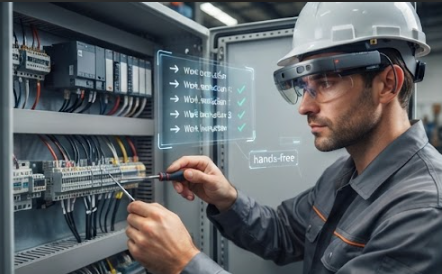
The biggest fork is not a specification at all. It is whether the operator looks at a screen or through one. A tablet wins whenever the task involves reading a schematic, comparing two values, or typing a long note, because a ten-inch panel shows all of it at once without scrolling. It loses whenever both hands are already occupied, which describes most assembly, wiring, and maintenance work. That is the entire case for AR smart glasses: not that they replace the tablet, but that they cover the subset of tasks where holding anything is the problem. Most plants that adopt them end up running both.
🤖 Android Builds Against Windows Builds
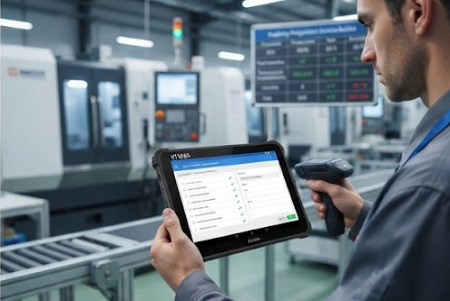
The second fork is the software estate, and it is less about preference than about what already runs on the floor. If the plant's inspection app, labelling tool, or device management stack was built for Android, an Android tablet slots in with no translation layer and no retraining. That is the practical argument for the HTQ10A on sites where the mobile fleet is already Android-managed. The counter-argument is legacy: a Windows-only configuration utility or an old serial tool will not move, and no amount of platform preference changes that.
🌡️ Cabinet Heat and Sealed Enclosures
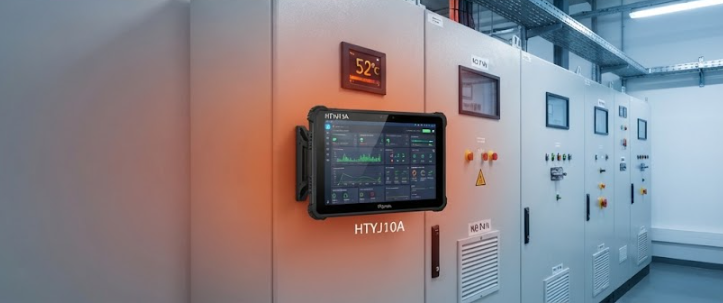
The third fork is thermal, and it is the one that humbles consumer hardware. An edge device mounted inside a sealed cabinet in August is not in a room, it is in an oven with no airflow, and throttling shows up as a mysterious slowdown that nobody connects to temperature for weeks. The HTYJ10A is built for that duty rather than for a desk, and the comparison point that matters is not peak performance but sustained behaviour: what the device does after four hours sealed in a warm enclosure, not what it scores in the first ninety seconds.
🎯 🔌 Legacy Ports Still Decide Shortlists
The fourth fork is the least glamorous and the most decisive. Plenty of plants still run a serial device, a legacy scanner, or a proprietary programming cable that will not be replaced this decade. A tablet that cannot talk to it is not a tablet, it is a paperweight with a nice screen. Port count and adapter support quietly eliminate more candidates than any performance metric, and this is the column experienced buyers check first precisely because it is boring.
📊 The Shortlist in One Table
Put the four forks together and the shortlist writes itself. One candidate wins on hands-free work, one on software estate fit, one on sustained thermal behaviour in a sealed space, and the port question can knock any of them out. Very few plants genuinely need all three at once, and the ones that do are usually running three different tasks rather than one task three ways.
| Question | What it eliminates | Who wins | Watch out for |
|---|---|---|---|
| Hands free or not | Tablets where both hands are busy | AR Smart Glasses | Not a full tablet replacement |
| Android or Windows estate | The platform your apps are not on | HTQ10A on Android sites | Legacy Windows-only utilities |
| Sustained heat in a cabinet | Consumer-grade thermal design | HTYJ10A | Peak scores hide throttling |
| Legacy ports and cables | Anything without the right input | Check before anything else | Adapters add failure points |
🔧 Where Each Format Wins
The pattern in plants that get this right is allocation by task rather than by team. Hands-free goes to the maintenance and wiring crews who need both hands and a short instruction. The Android tablet goes to inspection and quality teams already working inside a managed mobile estate. The thermally-hardened tablet goes into fixed positions, cabinets, and vehicle mounts where nobody can intervene if it gets hot. None of these replace each other, and pretending they do is how a rollout ends up with three shelves of unused hardware.
💡 Choosing Without a Bench Demo
If you cannot get a bench demo, ask four questions instead. Where will the operator's hands be, what platform are your apps already on, what is the hottest sealed place the device will live, and what does it have to plug into. Those four answers eliminate most of the field before anyone talks about price. Then you can explore our mini PC solutions for the fixed tier behind these devices, and read an industrial edge performance test for the measured version of the same shortlist, which is where most of these questions ultimately get settled.