A hotel rollout fails in a way an office never does, because the work has to happen while the building is still selling rooms. There is no weekend when the front desk closes, and a noisy installation in a corridor at two in the afternoon is a guest complaint waiting to happen. I have staged enough of these to know the sequence that keeps a property trading throughout. This is that plan, built around three form factors that divide the work cleanly: the HTNJ10C at the counter, the HTNJ08A inside the rooms, and the SH6 in the hands of housekeeping.
🛎️ What the Rollout Has to Cover
Before ordering anything, it helps to be honest about how many distinct jobs there are. A front desk needs a screen that a receptionist can glance at while talking, and it has to survive being knocked at the counter edge. A guest room needs something unobtrusive that a housekeeper can clean around. Housekeeping needs something that goes in a pocket or on a belt and survives a full shift of stairs and linen carts. Three jobs, three form factors, and every failed rollout I have been called to fix started by trying to use one device for all of them. That is why this plan starts by grouping hotel front desk and guest room hardware by role before a single bracket is drilled.
🔋 🔌 Power and Data Before Anything Else
The unglamorous truth is that most installation days are lost to power and data, not to devices. Reception counters rarely have a spare outlet where you want one, and guest room panels almost never have data where the old telephone jack was. Survey every position, photograph it, and confirm a route before the installation date. Where a route does not exist, the honest answer is to schedule a small works package rather than to improvise on the day, because improvised cabling in a guest area is the single most common reason a property later regrets the whole project.
⚙️ 🖥️ Mounting at the Reception Counter
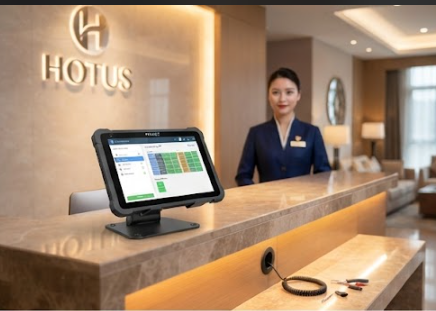
The counter unit takes the most abuse and gets the least thought. It needs to sit where a receptionist can read it without turning away from a guest, which usually means low and angled rather than upright and central. It also needs to be secured, because a counter screen that can be pushed is a counter screen that will be pushed. The HTNJ10C mounts well in this position because its larger panel is readable from a standing position across the desk, and the casing takes the knocks that a front desk delivers as a matter of course.
🛏️ Fitting Panels Inside Every Suite
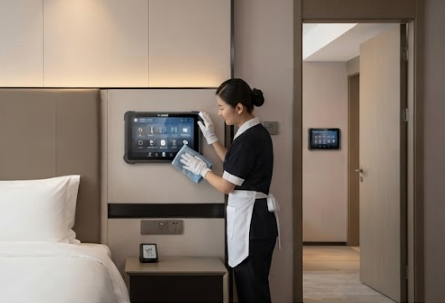
Guest space panels are a different problem entirely. The device has to be somewhere a guest finds intuitive and a housekeeper does not fight, which usually means a bedside or entry position at a consistent height across every room. Consistency matters more than cleverness: if the panel is in a different place in every room type, guests will ask about it. The HTNJ08A suits this role because the smaller panel fits a bedside position without dominating it, and the sealing survives the cleaning routine that a room gets between every stay.
🏟️ 🧹 Handhelds for the Housekeeping Team
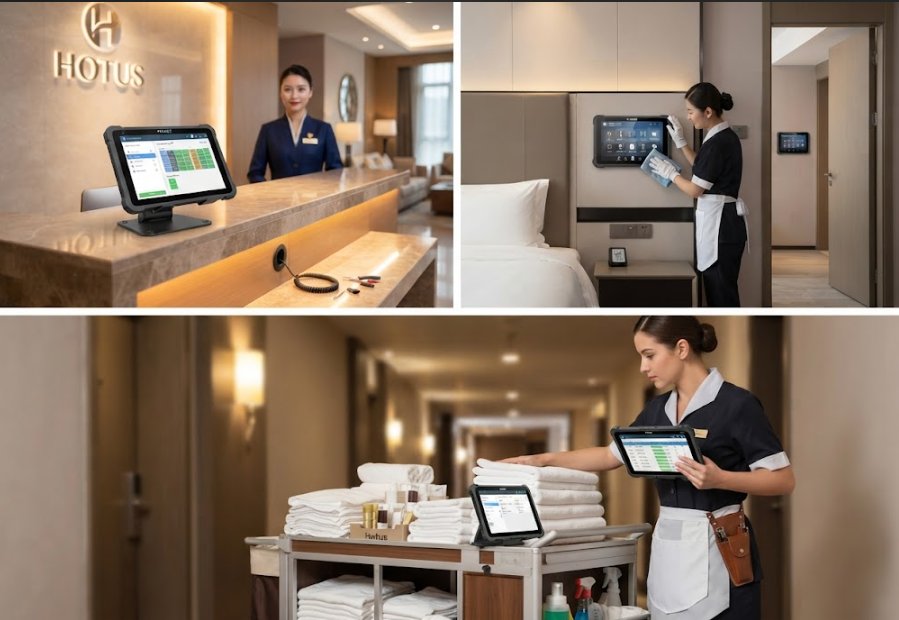
Housekeeping is the group most often forgotten until the end, and then everything goes wrong at once. A device that is fine on a belt for ten minutes is not fine for a full shift of stairs, and a screen that needs two hands is not usable while carrying linen. The SH6 works here because it is small enough to be carried one-handed and tough enough to be set down on a cart. The practical detail that decides whether it gets used is a holster or belt clip supplied with the unit rather than ordered later.
🌐 Network Segmentation for Staff Devices
The step that protects the property is segmentation. Staff devices should never sit on the same network segment as guest Wi-Fi, and a rollout that skips this creates a problem that is expensive to fix later and invisible until something goes wrong. Give the front desk, the room panels, and housekeeping their own segment with its own credentials, and document which is which. It takes an extra hour on installation day and removes a category of complaint that hotels are badly placed to absorb.
📋 A Commissioning Checklist That Holds
Commissioning is where a good installation becomes a supportable one. For every position, record what was mounted, where it is, what it connects to, and what it is allowed to talk to. Photograph the install before the trim goes on. Test each unit at the position it will actually be used, not on a bench, because a counter that reads well at eye level can be unreadable at the angle a receptionist actually stands. Then hand the property a document it can use when something fails in eighteen months.
| Position | What it needs | Common failure | Check before signing off |
|---|---|---|---|
| Reception counter | Low angled mount, secured | Screen pushed out of position | Reads from standing height |
| Guest room panel | Consistent position per room type | Inconsistent placement confuses guests | Same spot in every room of a type |
| Housekeeping handheld | One-handed carry, holster supplied | Left on a cart, not carried | Holster issued with the unit |
| Network | Separate segment from guest Wi-Fi | Staff devices on guest network | Segments documented and tested |
💡 Handover and What to Document
The last day is a handover, not a finish. Walk the property with the duty manager, show each position, and leave a single page that lists what was installed where and who to call. Label the units and record the labels. None of this is difficult, and all of it is what separates a rollout that still works in two years from one that quietly degrades into a drawer of spare parts. You can explore our mini PC solutions for the fixed tier sitting behind these devices, and read a hotel hardware performance test for how these positions behave once they have been running for a season.