F502, HTYJ10A and AR Smart Glasses: Three Contact Points Where a Plant Walk Stalls
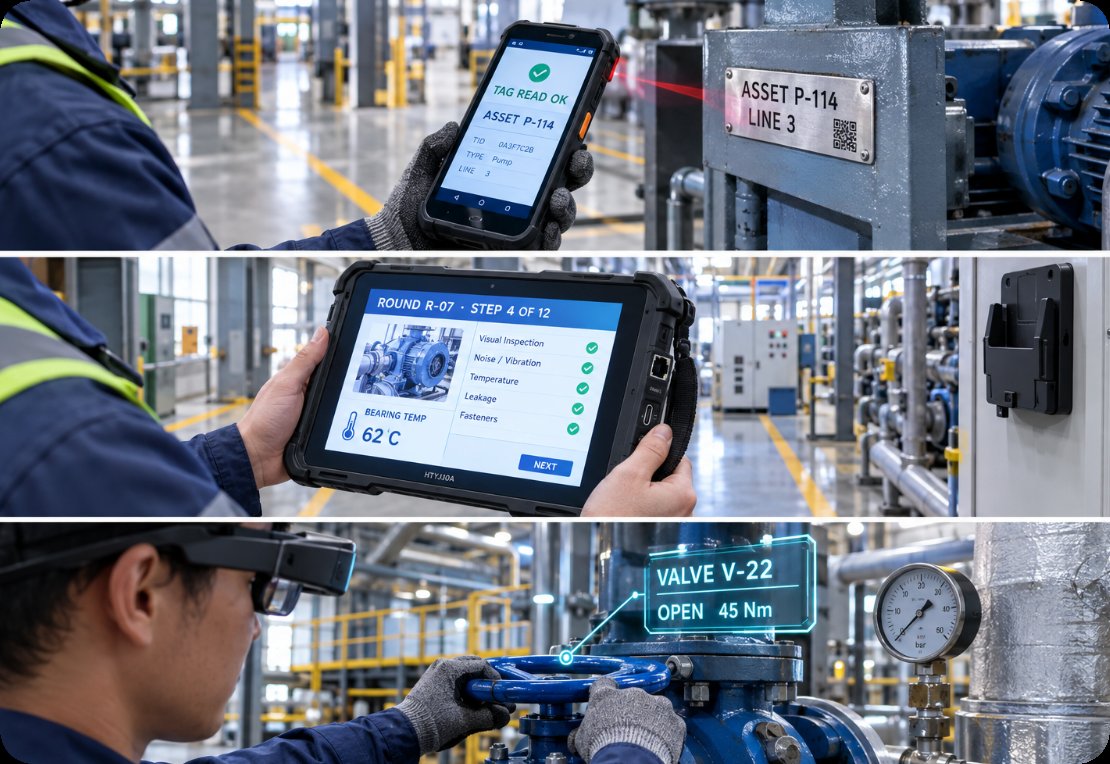
An inspection round is easy to draw and hard to run. An operator walks a fixed route, stops at each asset, identifies it, reads a condition, records it, and moves on. That reads as one activity. In the plant it is three separate devices working within seconds of each other: a handheld that turns an asset into a record, a tablet that holds industrial inspection solutions as the checklist and the log, and glasses that keep instructions in front of the operator while both hands stay on the machine.
Because they are used back to back, faults are almost never reported at the right layer. Something goes wrong at one contact point, the operator notices it at the next, and the ticket names whichever device was in hand when the complaint was made. Separating the three areas before anyone opens a spares box is the most useful habit a maintenance planner can build.
Why the Stop Is Rarely the Real Fault
The instinct is to trust the last symptom. If the checklist will not advance, the screen gets the blame. If a badge will not read, the reader gets the blame. If an overlay sits a few degrees off, the glasses get the blame. Each is reasonable and each is often wrong, because these devices hand work to one another in a chain. A read that never happened cannot be displayed, and a position that was never resolved cannot be overlaid.
It also helps to stop treating the round as one skill. Reading a tag, deciding against a checklist, and keeping instructions visible are three distinct tasks. Sorting then gets simpler: decide which contact point stalled, then decide whether the fault belongs there.
The Hand: Badges That Read Once and Then Refuse
The first contact point is the handheld, and it works in the least forgiving conditions on the route: at arm's length, one-handed, sometimes in gloves, sometimes against curved metal that throws radio energy back at the antenna.
The RFID Barcode Scanner F502 is built for that posture. It runs an MT6762 octa-core 64-bit processor at 2.0 GHz, with 2 GB of RAM and 16 GB of storage or 4 GB and 64 GB, expandable through a micro SD card up to 256 GB. Its 5.5-inch IPS panel at 720 x 1440 keeps a pick list readable without zooming. Position fixes come from GPS, Galileo, Glonass and Beidou together, which matters in a yard where one constellation sits low behind a silo. The body stays under 300 g, and charging and data travel over one Type-C port with OTG.
Three failure signatures show up here. A read that passes at the bench and fails at the machine is nearly always tag orientation or metal shadowing at the mounting point, not a tired reader. A position that wanders inside a steel hall is physics, and the practical fix is to record the check at the doorway instead. A cell that dies before the round ends calls for a spare rather than a new unit.

The Screen: A Checklist That Freezes Mid-Round
The second contact point is the tablet, and its job is different. It identifies nothing. It holds the checklist, shows what was recorded, and decides what happens next. That makes it the layer most likely to be blamed, since a stalled checklist is the most visible failure on the route, and the most likely to be innocent, since it can only display what the previous contact point handed it.
The HTYJ10A Rugged Tablet carries a 10-inch LCD at 1200 x 1920 and 560 nits, behind a 10-point capacitive panel with 7H hardness, driven by an Intel Core i5-10210Y or i7-10510Y. The 7.6 V, 3500 mAh pack charges over a DC 19 V, 3.42 A adaptor, and networking is WiFi 6 with Bluetooth 5. Sealing is IP67 against a 1.22 m drop rating. Ports include RJ45, Type-C, Mini HDMI, audio, TF, SIM and a 12-pin POGO PIN, with 4G, NFC, scanning, a fingerprint reader and a charging dock as options. The chassis measures 28.4 x 19 x 2.5 cm and the packed gross weight is 2.1 kg.
Failure signatures here read differently. A screen that cannot be read in a yard at midday is usually a viewing-angle problem rather than a brightness figure. A touch panel that misses while gloves are worn is behaving exactly as a 7H capacitive surface should. A tablet found flat in its cabinet overnight points at the 12-pin POGO connector rather than the pack, because a dock that has not seated will leave a charged unit in storage. And a checklist that freezes mid-route is almost always waiting on a record from the handheld. Routes mixing a long walking phase with a fixed station often split across sizes, which is what the wider rugged tablet range was designed around.

The Eye: An Overlay That Slides Out of Register
The third contact point is the newest and the least understood. AR Smart Glasses exist so that nobody has to look away from the machine to read the next step. The unit projects a 120-inch virtual screen at a four-metre equivalent distance inside a 51-degree field of view, switches to 3D with one button, and carries myopia adjustment across 0 to 600 degrees.
Its failure signatures are the easiest to assign to the wrong device. An overlay that drifts a few degrees looks like a rendering fault and is usually a positioning one, because the glasses draw precisely what they are told and those coordinates came from somewhere else. Focus complaints are a fit question rather than a defect, since the adjustment range is wide but not universal. A blank overlay is a live-data symptom first, because a network dropout and a rendering crash look identical from behind the lens. Teams running these units alongside handheld capture document both sides together, which is what the wider AR-assisted inspection approach covers.
Faults That Cross Between the Layers
Two patterns account for most misdiagnosed calls. The first runs from the hand to the eye. An operator scans a tag from the aisle, forty metres from the machine inside a steel structure, then walks over. The glasses draw an overlay a few degrees off, and eyewear takes the blame for a position fix that was weak when it was taken. The second runs from the hand to the screen: a checklist refuses to advance, the tablet is pronounced frozen, and the cause is a record that was never committed even though the reader gave its confirming tone.
A third pattern is easy to miss. A reader that seems to fail repeatedly can be reacting to the operator's attention, because with an overlay in front of the eyes it is possible to aim the beam from memory and miss the tag. One rule covers all three: never change a part at the contact point where the fault appeared until the previous one has been cleared.
A Layer Ownership Table
The table is arranged by what the operator reports rather than by device, because a complaint is always made at whichever contact point the operator is standing at when it is raised.
| What the operator reports | Contact point that owns it | First thing to check | What it is not |
|---|---|---|---|
| A tag reads at the bench but not on the machine | The hand | Tag orientation and metal shadowing at the mounting point | A failing reader |
| The checklist will not move to the next step | The hand, then the screen | Whether the record was committed before the checklist was opened | A frozen tablet |
| The overlay sits a few degrees off the equipment | The hand | Where the last position fix was actually taken | A rendering fault in the glasses |
| The tablet is flat after a night in the cabinet | The screen | Whether the 12-pin POGO connector seated on the dock | A tired battery pack |
| The screen cannot be read outdoors at midday | The screen | Viewing angle and screen condition, not only the brightness figure | A failing panel |
What the Fix Looks Like Device by Device
Once the layer is settled, the repair is usually small and cheap, and it is the same part each time. A recurring bad read is a tag placement job rather than a purchase order, a recurring flat tablet is a dock inspection every few weeks, and a recurring focus complaint is a fit trial before the roster changes.
Weight is the one figure that resists a clean comparison. The handheld specification block leaves it blank, so only the product description figure is quoted below; anything more precise should come from the product page rather than be inferred from a similar model.
| Device | Contact point | Published specification to plan the round around |
|---|---|---|
| RFID Barcode Scanner F502 | The hand | MT6762 octa-core 2.0 GHz, 5.5-inch IPS 720 x 1440, under 300 g, GPS with Galileo, Glonass and Beidou |
| HTYJ10A Rugged Tablet | The screen | 10-inch 1200 x 1920 at 560 nits, Intel Core i5-10210Y or i7-10510Y, IP67 with a 1.22 m drop rating, 7.6 V 3500 mAh |
| AR Smart Glasses | The eye | 51-degree field of view, 120-inch virtual screen at four metres, single-button 3D, 0 to 600 degree myopia adjustment |
Keeping the Next Inspection Quiet
A quiet round is not a round with better hardware. It is a round where every fault is logged at the contact point that caused it. Three changes do most of the work: name the contact point in the ticket, so a flat tablet after a night in the cabinet is filed against the dock rather than the battery; keep one spare of the item that genuinely fails; and clear the previous layer before swapping a part. Handled that way, the handheld, the tablet and the glasses stop competing for blame and start covering for one another's weak moments, which is the only reason to carry all three onto the same route.