Most product pages for remote assistance gear quote the same two numbers: resolution and battery capacity. Neither one tells a maintenance manager what he really wants to know, which is what a single support session costs the hardware on the floor. I have started keeping receipts instead of running benches. Last month we timed one forty-minute expert call across three devices from the same bag: the AR Smart Glasses worn by the technician, the RT82 rugged tablet that carried the uplink, and the SH6 handheld that started the morning as the spare. The numbers below come from that one shift, and they say more than any spec sheet column.
💡 Why the Receipt Beats the Bench
A laboratory benchmark answers how fast a processor finishes a fixed task. A session receipt answers a different question: how much of the device was used up while a person wearing it did their job. The two can disagree in surprising directions. A tablet that wins a video-playback test can still drain twice as fast on a live call, because an assistance session keeps the camera open, the radio busy and the screen awake at the same time, with no idle gap for the battery to catch its breath. That is why we stopped comparing spec sheets and started writing down what each unit had left when the expert said goodbye.
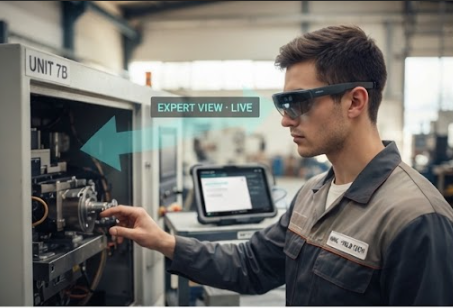
The Glasses Earn Their Keep in the First Five Minutes
The worn display does one thing and has to do it without being noticed. The AR Smart Glasses project an image equivalent to a 120-inch screen at four metres into a 51-degree field of view, with a 0-600 degree myopia adjustment that lets the technician leave his own prescription glasses on underneath. On the receipt for that call, the frame logged zero adjustments after minute five. That is the metric nobody publishes: how long a wearer stops thinking about the hardware. A heavy or misaligned headset gets taken off and set on the cart, and once that happens the expert is back to guessing from a shaky phone camera. The overlay stayed legible under the shop floor lights, and the technician glanced up at the arrows rather than down at a screen, which is the entire argument for a worn display.
A Hub That Carries the Uplink
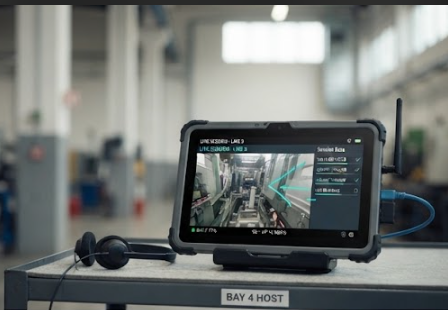
The RT82 ran the session itself. Its octa-core 2.9GHz 5G platform handled the encode while the 10.1-inch FHD panel at 400 nits stayed readable in the glare from the skylights, which mattered because the expert was drawing annotations directly onto the shared view. Upload speed is the number that decides whether those arrows arrive while they are still useful, and on the 5G connection the frames kept up with the technician's walk down the line; the receipt recorded two brief freezes, both inside the lift lobby, both recovered inside three seconds. The 10000mAh battery ended the call at 71 percent, and the IP67 enclosure meant the unit sat on a steel plate in the wash-down corner without anyone moving it first. At under 650 grams the tablet is still a two-hand device, which is exactly why the third unit in the bag exists.
The Second Handheld Pays for Itself by Noon
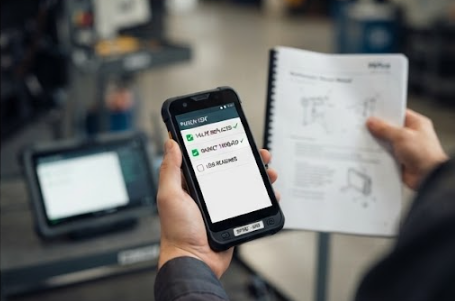
The SH6 began the shift as a spare and ended it as the runner. This 6.5-inch Windows 11 Pro handheld, with an Intel N-series processor in an IP65 drop-resistant body, took over every task that did not need the big screen: pulling the manual, scanning the asset tag, logging each step as the expert confirmed it. Its 380-nit HD+ display is dimmer than the tablet's, and it does not need to be brighter, because its job is proximity work at arm's length. By mid-shift the pattern was set: the worn display showed the expert's annotations, the RT82 hosted the call, and the SH6 moved through the punch list without ever joining the video. Splitting the work this way kept the session host in place on the cart, which kept the connection stable, which is the hidden reason the receipt looked clean.
🧪 Numbers From One Shift, Not a Laboratory
| Device | Role in the session | Display | Protection | End-of-call state |
|---|---|---|---|---|
| AR Smart Glasses | Worn display for expert annotations | 120-inch equivalent at 4 m, 51-degree FOV | Lightweight frame | Worn for the full 40 minutes, zero re-adjustments after minute five |
| RT82 | Session host on 5G | 10.1-inch FHD, 400 nits | IP67, 1.2 m drop | 71 percent battery, two freezes, both in the lift lobby |
| SH6 | Second handheld for the punch list | 6.5-inch HD+, 380 nits | IP65, drop resistant | Never joined the video; stayed on manual and asset-tag duty |
Where the Link Gets Thin
Every facility has the same dead spots: the lift lobby, the basement corridor, the aisle behind the metal shelving. The receipt is honest about them in a way a benchmark never is. Upload speed through two concrete walls dropped enough that the expert's view stuttered, and the useful detail is what each device did about it. The RT82 downgraded gracefully and kept the audio clean; the glasses kept the last frame on the retina display so the technician was not looking at a black lens; the SH6, which had the prior manual pages cached, became the fallback reference while the video caught up. Knowing which corners of the building thin out the link is worth more than knowing the peak throughput, because the session has to survive the worst corner, not the best one.
Reading the Receipt at Handover
The form we now close every call with takes two minutes and four lines: minutes connected, battery remaining on the host, freeze count and location, and whether the worn display stayed on. The point is not the paperwork. It is that after a dozen receipts you can see which claims on the spec sheet actually show up in your building. Battery capacity became real the day the RT82 finished a second consecutive call; ingress ratings became real the first time the tablet sat in the wash-down corner; the myopia adjustment became real when the seniorest technician stopped handing the glasses to the youngest one. A receipt turns marketing language into your own data.
Picking Hardware by the Shape of the Day
If your experts only ever look over one panel at a time, a handheld with a good camera may be all the session needs, and the SH6 shows how much work a second unit absorbs. If the job happens in glare, near machinery, or with gloved hands, the RT82's bright FHD panel and sealed IP67 body earn their size. If the technician needs both hands free for the repair itself, the worn display stops being a luxury. Most teams we talk to are not short of devices; they are short of a way to know which device carried which part of the call. Start writing the receipt, and the next purchase argues for itself. remote assistance solutions page collects the full kit for this workflow, and the RT82 Rugged Tablet, the AR Smart Glasses and the SH6 pages carry the full specifications behind the numbers above. The rugged tablet range page lists the wider family, and our product comparisons and competitor analysis section adds new field notes every week.