Last quarter I spent two weeks inside a 40-bed private clinic that had been running its whole operation on ageing office desktops. The front desk, the imaging room, the nurses' station, and the record archive all shared one overloaded server, and the result was a daily pattern of slow logins, frozen radiology screens, and nurses carrying paper notes because the charting terminal was in use. By the time the clinic called us, the fix was not a faster desktop. It was a rethink of what belongs on the desk, what belongs in a hand, and what belongs in a closet.
✅ Why a Growing Clinic Outgrew Standard Desktops
A clinic is not an office, even though it looks like one. Medical records software, imaging viewers, and billing systems all run at the same time, and none of them tolerate a dropped connection or a spinning cursor in the middle of a consultation. The machines sit in rooms where they are occasionally sprayed with disinfectant. They are switched on at seven in the morning and expected to still be responsive at nine at night. And the staff move between stations all day, so the workstation cannot be a heavy tower bolted under a desk.
That combination is exactly what consumer desktops are not built for. After our first site visit we recommended a three-tier layout that separates the roles instead of forcing one machine to do everything. For clinics that want to see the same logic in other departments, our dedicated medical workstation solutions cover the same three tiers across a wider range of hardware.
🛡️ ST13-J: The Rugged Tablet That Follows the Nurses
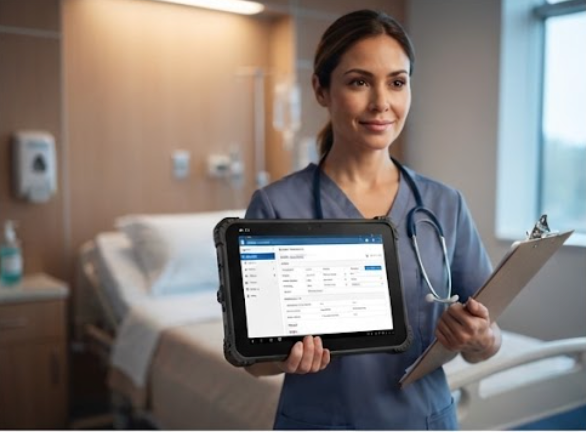
The most surprising change was removing desktop terminals from the nurses' station entirely. Instead, each nurse carries a ST13-J 13.3-inch rugged industrial tablet on the ward round. The tablet runs the same charting software as the fixed stations, but it moves with the nurse from bed to bed, which removed the queue at the single terminal that used to form every morning.
The ST13-J earns its place in a clinic for reasons that have nothing to do with speed. The case is sealed against the disinfectant wipes used between patients, and the 13.3-inch screen is large enough to read a medication schedule without zooming. Because it is a Windows tablet, the clinic did not have to retrain staff or re-buy software licences. The battery carried the nurses through a full twelve-hour shift on the ward, and the unit docked in the station at night to charge alongside the handover notes.
HCAR5000 MI: The Quiet Engine in the Reading Room
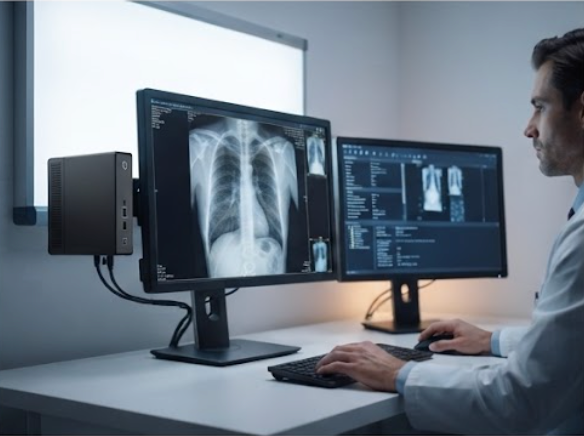
Radiology was the second problem. The imaging workstation sat in a small room next to the X-ray suite, and the old tower took almost a minute to open a single study. The clinic replaced it with a HCAR5000 MI mini PC built on the AMD Ryzen 5000H series, which gave the reading room enough compute to open studies in seconds without the fan noise that used to distract the radiologist.
The HCAR5000 MI is compact enough to mount behind the monitor, so the reading room desk gained back the space that the tower used to occupy. The machine has the display outputs needed for a primary screen plus a diagnostic reference monitor, which matters more in a clinic than raw benchmark numbers. For a department where the same PC must serve the PACS viewer, the dictation tool, and the occasional video consultation, the extra cores are not wasted.
💾 WTR PRO AMD: The 4-Bay NAS That Replaced a Failing Server
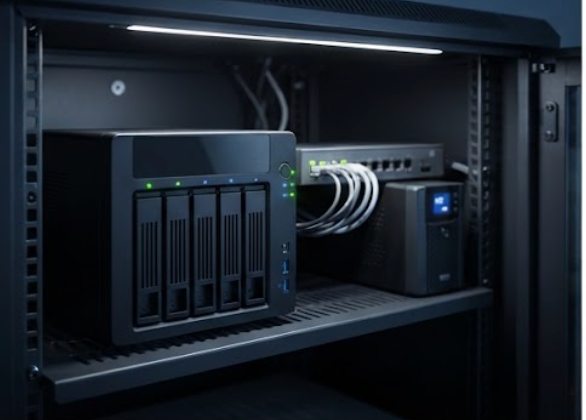
The third tier was the one nobody saw coming. The clinic's record server was a decade old, and its backups had not been verified in months. Rather than buy another single-disk server, we moved storage to a WTR PRO AMD 4-bay NAS mini PC, which gives the clinic four drive bays in a desktop unit that sits in the IT closet and runs Windows 11 just like every other machine on the network.
The WTR PRO AMD changed how the clinic thinks about its data. Patient images now have a second copy on a separate disk, and the night-time backup job that used to take hours on the old server finishes inside the maintenance window. Because it is a standard mini PC rather than a proprietary NAS appliance, the clinic's IT contractor can service it with the same tooling they already use for the rest of the fleet. For a facility that has never had a formal disaster-recovery routine, this single unit removed the most dangerous single point of failure in the building.
Comparing the Three: Which Device Does What
| Feature | ST13-J | HCAR5000 MI | WTR PRO AMD |
|---|---|---|---|
| Form factor | 13.3-inch rugged Windows tablet | Compact mini PC | 4-bay NAS mini PC |
| Primary role | Mobile ward rounds and charting | Imaging and consultation workstation | Central storage and backup |
| Processor | Windows platform | AMD Ryzen 5000H series | AMD platform |
| Storage | Onboard SSD | M.2 SSD | Up to four drive bays |
| Mounting | Handheld or cart | Behind-monitor mount | Desk or rack shelf |
| Best fit | Nurses, mobile staff | Radiology, front desk | IT closet, record archive |
None of the three competes with the others. The ST13-J follows the staff, the HCAR5000 MI powers the fixed workstations, and the WTR PRO AMD holds the data. The clinic runs all three from the same management console because they are all Windows devices, which is the quiet reason this combination works so well together.
🏥 Planning Your Own Clinic Computing Upgrade
Start by counting the roles, not the machines. If you have staff who move between beds or rooms, put the ST13-J class of rugged tablet on your list. If you have a department that opens large files or runs several applications at once, the HCAR5000 MI class of mini PC is the sensible replacement for a tower. And if your records, images, or backups live on a single failing disk, move that workload to a multi-bay NAS like the WTR PRO AMD before it fails on its own schedule.
Three months after the retrofit, the clinic reported the same pattern we hear from most healthcare deployments: the complaints about slow computers stopped, the nurses stopped queuing for a terminal, and the IT contractor's phone stopped ringing. The hardware did not add new features to the clinic's software; it removed the barriers that were stopping the software from doing its job.
Start the Conversation
If your clinic or medical facility is still running on office-grade desktops, you do not need a bigger budget or a new IT team. You need the right hardware for each role. Our rugged mini PC solutions page lays out the full range, and the product pages for the ST13-J, the HCAR5000 MI, and the WTR PRO AMD have the full specifications to size your own deployment. We work with clinic IT teams on the sizing, the mounting, and the backup plan, so you are not buying boxes and hoping.