Ask a facilities team when their kiosks break and you will get a list of symptoms: a blank screen, a frozen playlist, a touch panel that stopped responding. That list is accurate and almost useless, because symptoms arrive out of order and the same symptom has a different cause depending on when it appears. A blank screen in the first week is a configuration problem; a blank screen in year four is a capacitor. The useful question is not what failed but when, because the timing narrows the cause faster than any diagnostic menu. This article walks the failure timeline of a self-service installation from commissioning to end of life, and at each stage it names the cause that actually shows up. If you are building the support plan, start from digital signage and kiosk solutions and then write the triage order against the timeline rather than against the error log.
The First Week Is Not the Baseline
Failures in the first week are almost never hardware. They are configuration, compatibility, and the things nobody could test until the unit was live on the network with real content. A media player that renders perfectly on the bench stutters once it is pulling assets over a congested VLAN. A scheduled reboot that was never configured means the unit runs for nine days and then behaves strangely for reasons nobody can reproduce. Remote management credentials that work from the office and fail from the site are usually a firewall rule rather than a fault. The practical response is to treat the first week as commissioning rather than as uptime: watch it daily, log everything, and do not let the first week's behaviour become the baseline you measure the rest of the deployment against.
Touch Panels Wear at the Hands, Not the Chip
Interactive terminals fail at the surface far more often than at the board. The touch layer is the only part the public touches, and it takes the whole of the wear: scratches from rings and keys, residue from cleaning agents that were never approved for coated glass, and the slow drift of a capacitive layer that has been pressed millions of times in the same three places. What looks like a dead panel is very often a panel that needs recalibration, and what looks like a recalibration problem is very often a cleaning product eating the coating. The HTQ10A Android Rugged Tablet is specified for this duty because the touch layer is replaceable as a field part and the housing seals against the dust and liquid that reach a public terminal. Before swapping a board, recalibrate, then check what is being used to clean the glass.
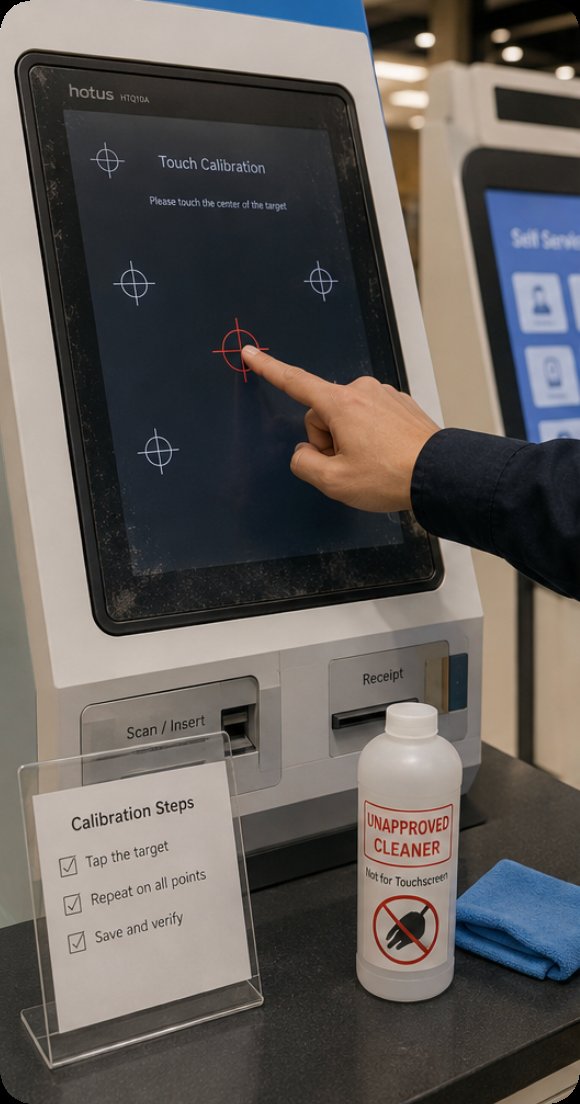
An HTQ10A interactive panel being recalibrated on site, where the touch layer takes the wear long before the board does.
Heat Plus Dust Equals Slow Damage
The failures that happen in year two are the ones caused by the enclosure rather than the electronics. A kiosk is a sealed box that has to run every hour of every day, and the two things that end that are heat and dust. Dust blocks the intake path and insulates the components it settles on; heat then does the rest, and a fan that was sized for a cool room cannot compensate once the filter is matted. The symptoms are maddening because they are intermittent: a unit that reboots at three in the afternoon in August and runs perfectly in October is a thermal problem, not a software one. The WTR PRO AMD driving the content stack should be treated as a thermal design exercise first and a compute decision second: give it filtered intake, keep the exhaust path clear, and log the internal temperature so the degradation is visible before it becomes an outage.
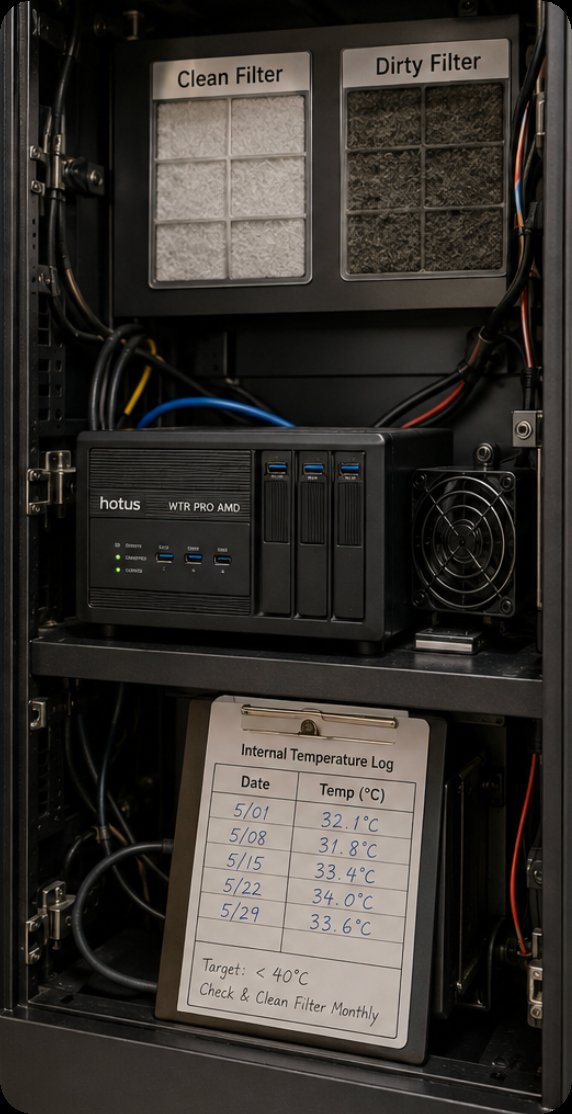
A WTR PRO AMD content player inside a kiosk enclosure, where a filtered intake path and logged internal temperature prevent the slow thermal failures of year two.
📱 Small Enclosures, Big Thermal Mistakes
Compact terminals make the thermal problem worse, because there is no airflow budget to waste. A panel mounted in a slim wall cavity or a narrow pedestal has almost no convective path, and the heat that a larger enclosure would shed through its skin has to be moved by conduction to the chassis instead. The 5.5-inch SH5-W fits installations where nothing larger will go, and in those installations the two rules that keep it alive are unglamorous: do not mount it against an insulating surface, and do not seal the cavity completely. A five-millimetre vent gap at the top and bottom of a recess does more for service life than any amount of specification. The units that fail early in tight spaces were almost always installed by someone who treated the gap as cosmetic.
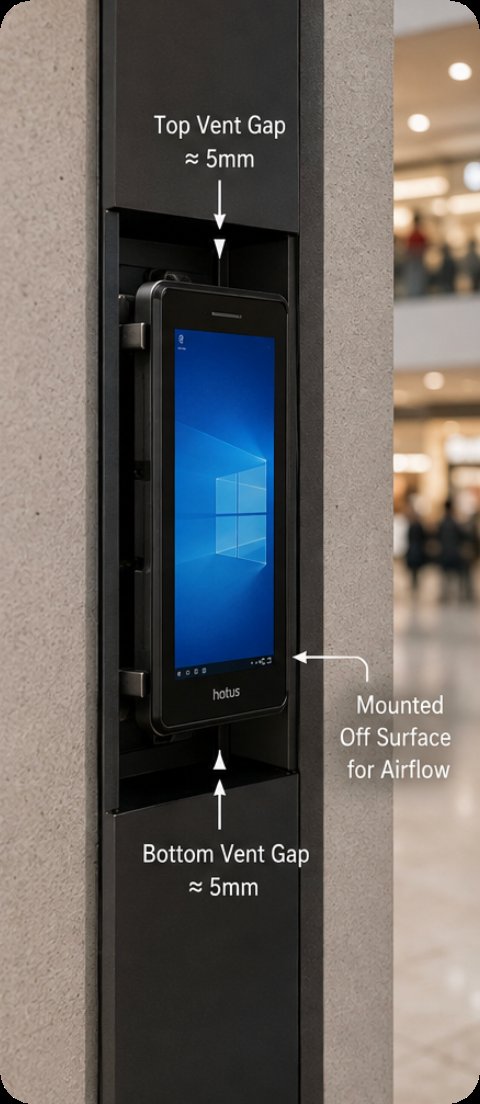
An SH5-W mounted in a tight recess with a deliberate vent gap, where conduction to the chassis does the work that airflow cannot.
After the Update, Before the Audience Arrives
A large share of public-facing outages are self-inflicted and timed badly. A content push that lands during trading hours, a firmware update that reboots a terminal mid-campaign, a certificate that expires on a Sunday morning and takes every unit offline at once: none of these are hardware faults and all of them look like hardware faults to whoever is standing in front of the screen. The mitigations are procedural. Push content and firmware in a maintenance window, stagger the fleet so a bad update cannot take everything down simultaneously, and put certificate expiry dates in a calendar with a reminder a month out rather than relying on a browser warning. Most organisations learn this once, expensively, and then never forget it.
🔋 Power Events Nobody Rehearsed
Kiosks sit at the end of electrical runs that were designed for lighting, sharing circuits with cleaning equipment and vending machines, and they are expected to survive that. A brown-out that never fully drops the supply is harder on a power supply than a clean outage, and an ungraceful shutdown repeated a dozen times will eventually corrupt a filesystem that no amount of rebooting will repair. The fixes are cheap: a small uninterruptible supply that gives the unit time to shut down cleanly, a configured behaviour on power restore so the fleet does not all draw inrush current at the same moment, and a filesystem check in the maintenance schedule rather than when something stops working. The table maps each phase of the timeline to the cause that actually shows up.
| When it fails | What it usually is | First thing to check | What prevents it |
|---|---|---|---|
| First week | Configuration, network, credentials | Remote access and asset path | Commissioning period with daily logs |
| Touch unresponsive | Calibration drift, cleaning residue | Recalibrate, then inspect coating | Approved cleaning agent, replaceable layer |
| Year two, in summer | Thermal and dust build-up | Internal temperature log, intake filter | Filtered intake, clear exhaust path |
| Compact enclosures | No convective path | Vent gap and mounting surface | Conductive path to chassis, vent gap |
| After an update | Staged rollout, expired certificate | Update window, certificate dates | Maintenance windows, staggered fleet |
| After power events | Ungraceful shutdown, filesystem | Shutdown behaviour, restore policy | Small UPS, staggered restore |
| Year five | Capacitors, storage wear, connectors | Service hours against expected life | Planned refresh before the curve |
End-of-Life Symptoms Nobody Logs
The last phase is the one with no drama and no single cause. Storage cells reach their write endurance and start returning errors on the blocks that get rewritten most. Electrolytic capacitors drift out of tolerance and the unit becomes sensitive to supply ripple it shrugged off for years. Connectors that were mated once and never touched begin to make intermittent contact as thermal cycling works them loose. Individually none of these look like a failure; together they produce a terminal that is unreliable in a way no single repair fixes. The only useful response is to log service hours and plan the refresh against the curve rather than waiting for the first unit to die in public.
🔮 A Triage Order for the Next Call-Out
What all of this produces is an order of investigation rather than a list of parts. Check the timing first, because it tells you which family of cause you are in. Check the environment second, because heat, dust and power account for more public-terminal failures than any component. Check the surface third, because the touch layer and its coating are the only parts the public actually wears out. Only then open the enclosure. Our rugged mini PC solutions cover the content players that sit behind these screens, and a practical maintenance guide for digital signage kiosks covers the preventive side of the same timeline. Send us your enclosure photographs and your outage log and we will tell you which phase of the timeline your failures are actually coming from.