Operators who keep honest records tend to arrive at the same uncomfortable number: somewhere between a quarter and a half of the call-outs raised against a self-service estate turn out not to be equipment faults at all. The screen was asleep rather than dead. The touch layer needed cleaning rather than replacing. The certificate expired rather than the network failing. None of that is good news, because the van still drove out and the terminal still looked broken to whoever reported it, but it is extremely actionable: a large share of the perceived failure rate is removable without touching a single component. This article works through the misdiagnoses in the order they are most often made, starting with the ones that cost the most engineer time for the least actual fault. If you run a support desk, begin with digital signage and kiosk solutions and then add a triage step before you add a spare parts budget.
One Queue in Three Disappears on Inspection
The first thing worth doing is unglamorous and takes a fortnight: record what the engineer actually found, not what was reported. Reported as "screen dead", found to be "no input signal". Reported as "touch not working", found to be "protective film never removed". Reported as "keeps freezing", found to be "video file encoded at a bitrate the player cannot sustain". Two weeks of that record will tell you which misdiagnosis costs you the most, and it is almost never the one the team assumes. The pattern also changes how you write the reporting form, because the questions that would have caught the fault in advance are usually obvious in hindsight and absent from the form.
Asleep Rather Than Broken
The most common false fault in any public estate is a terminal that has done exactly what it was configured to do. Power schedules set for trading hours leave a dark screen outside them, and a member of staff arriving early reports a dead unit. Screen blanking after a period of inactivity looks identical to a failure from three metres away, and a motion sensor that has been covered by a promotional board or a delivery will let the screen sleep while the room is full. The HTXUK10A-55 Rugged Tablet ships with schedule and wake configuration that most operators never revisit after commissioning, which means the settings that made sense on day one are still governing a site whose trading pattern has since changed. Before dispatching anyone, check what the unit is supposed to be doing at that hour.

An HTXUK10A-55 that is following its power schedule rather than failing, the single most reported false fault in a public estate.
🖥️ A Screen Nobody Cleaned Correctly
The second-largest category is the one nobody wants to hear about, because it is housekeeping. Touch layers are coated, and the wrong cleaning agent degrades that coating slowly and unevenly, leaving areas that respond intermittently and get worse each time they are wiped. Protective film left in place after installation produces the same symptom from the first day. Static build-up in a dry, carpeted concourse can make a capacitive panel behave erratically for hours. The SH6 Rugged Tablet is built to survive public handling, but no touch layer survives indefinitely against an ammonia-based spray applied twice a day. The diagnostic sequence is simple and should be written on the reporting form: inspect for film, check what is being used to clean, then recalibrate, and only then consider the hardware.

An SH6 touch layer being inspected with an approved agent, where the fault was cleaning practice rather than the panel.
A Network Link Nobody Actually Lost
Reports of network failure are where the gap between symptom and cause is widest. A terminal showing a stale or error page is often still perfectly connected; what has failed is the trust chain or the name resolution behind it. An expired certificate is the classic, and it is brutal because it takes every unit offline simultaneously on a date someone set a year earlier and nobody diarised. A DNS change that was applied to the corporate network and not to the VLAN the kiosks sit on produces the same "network down" report from a site that has full connectivity. Clock drift past a certificate's validity window does it too, and that one looks like random intermittency until you notice it correlates with units that have been powered longest. The HCAR5000 MI running the content stack should have its certificate dates, time source and DNS settings in the same monitoring view as its uptime, because all three fail as connectivity from the outside.
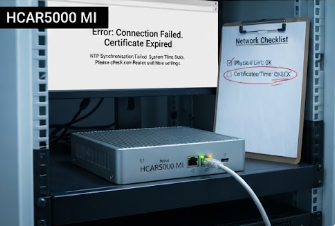
An HCAR5000 MI whose certificate dates, time source and DNS settings share the monitoring view with its uptime.
Sharp Image, Wrong Source
Display complaints contain a whole family of false faults. A panel reporting "no signal" with a perfectly good panel behind it is usually a source that switched, a cable that worked loose at one end, or a resolution the screen cannot sync to. Modern panels are unforgiving about being fed a mode they do not support, and a player that was replaced with a different model can quietly output something the display rejects. Swapping the source to a known-good input takes ninety seconds and resolves a category of call-out that otherwise results in a display being replaced unnecessarily. It is also the reason to keep a photograph of the rear connections inside every enclosure, so that whoever opens the cabinet can see what normal looks like.
Content Stuttering Under Its Own Weight
Performance complaints are the most likely to be misattributed to hardware. A video that stutters is nearly always a content problem: a bitrate beyond what the player decodes smoothly, a resolution that forces software scaling, or a file that was exported with a codec the platform handles poorly. The player is not struggling, it is being asked to do something unreasonable, and replacing it with a faster model moves the stutter rather than removing it. The check is quick: play a known-good reference file on the same unit. If the reference is smooth and the campaign is not, the fault is in the asset and belongs to whoever produced it rather than to the maintenance budget.
What a Real Failure Looks Like
Having said all that, genuine faults have signatures too, and the point of excluding the false ones is to make these easier to spot. Real failures are consistent rather than intermittent, they survive a reboot and a source swap, and they usually get worse on a visible curve rather than fluctuating with cleaning schedules or trading hours. A panel with a failing backlight dims progressively. A power supply on its way out becomes sensitive to mains variation. Storage at the end of its write life returns errors on the same blocks repeatedly. The table sets out the distinction that matters when someone is deciding whether to send a van.
| Reported symptom | Usually a false fault when | Usually a real fault when | Check before dispatch |
|---|---|---|---|
| Screen dark | outside trading hours, motion sensor covered | dark in trading hours, backlight glow visible | power schedule and sensor |
| Touch unresponsive | film present, wrong cleaning agent | dead zones persist after recalibration | film, agent, recalibrate |
| Network error page | certificate expiry, DNS change, clock drift | link down at the switch port | cert dates, time source, DNS |
| No signal | source switched, loose cable, unsupported mode | no signal on a known-good source | swap to reference input |
| Video stutters | reference file plays smoothly | reference file also stutters | play known-good asset |
Two Minutes of Checking Before Any Dispatch
The practical version of all this is a short script the desk runs before anyone is sent: is the unit within its scheduled hours, has anything changed in the network in the last day, does a known-good source or asset behave correctly, and what is the cleaning routine at that site. Four questions, two minutes, and on most estates it removes a third of the queue. The remaining two thirds get a faster response because the engineers are not driving to sites that were never broken. Our rugged mini PC solutions cover the players behind these screens, and a digital signage kiosk case study shows what that discipline looks like once it is running. Send us a month of your call-out records and we will tell you which of the five misdiagnoses is costing you the most.