School IT has one property that office IT does not: every device has to survive a term. A classroom machine runs from the first lesson of the morning to the last club of the afternoon, five days a week, for ten or twelve weeks without a maintenance window. Anything that needs attention mid-term becomes a problem in a teaching room, which is why the installation matters more than the hardware list. This guide covers a three-device classroom installation built around Hotus hardware: the Palm-sized miniPC as the fixed classroom machine, the SH5-W as the teacher's handheld, and the Handheld PDA F505 for the stock and asset rounds. The same rugged handheld tablets reasoning applies whether the site is a primary school or a further-education campus.
What Ten Weeks of Lessons Do to Hardware
A term imposes a duty cycle that an office never sees. The machine is switched on early, used continuously by different classes, and left running through breaks because the next lesson starts in ten minutes. Cables get kicked by bags, screens get touched by everyone, and no one has time to investigate a fault until the end of the day. The practical consequence is that an installation designed for a term has to be physically protected, quick to reset, and simple enough that a teacher can recover it without a technician. Planning for that duty cycle is what separates a classroom installation that lasts from one that generates a support ticket every week.
⚙️ The Fixed Machine: Mounting the Smallest Unit
The classroom machine is the Palm-sized miniPC, and its installation job is to disappear. Mount it behind the display or under the teaching desk with a VESA bracket so no cable runs across the floor and no child can reach the ports. Route the power and display cables through a single channel fixed to the desk leg or wall, and label both ends, because the person who moves the room in the summer will not be the person who installed it. Set the miniPC to wake on a schedule before the first lesson so the teacher is never waiting for a boot, and set it to sleep at the end of the day rather than staying on all night. Those two settings alone remove most of the daily friction around a classroom machine.
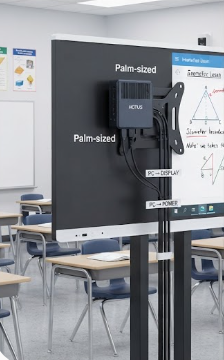
The mounting above shows the classroom machine doing its job of disappearing: fixed behind the display, cables in one labelled channel, and no loose hardware anywhere a bag or a foot can reach it. A machine that is mounted and scheduled does not need attention during the term.
🎓 The Teacher's Handheld: Carrying the 5.5-Inch Unit
The teacher's device has a different set of requirements, because it moves. The SH5-W is small enough to carry between rooms without a bag, which means it actually gets carried rather than left on a desk, and it survives a term of being put down on hard surfaces. Install it with a protective case and a lanyard or belt holster so it stays with the teacher rather than in a drawer, and configure the login so a teacher can pick up any unit in the school and reach their own session. That last setting matters more than it sounds: it turns a shared device pool into something staff will actually use, because no one has to hunt for their own unit before a lesson.
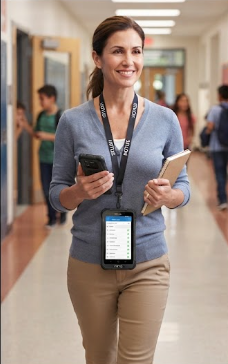
The handheld above is in the state that matters: carried, holstered, and ready, rather than parked in a charging cradle in a room nobody visits before lessons. A device small enough to carry is the one that gets used, and any-device login is what makes the pool work.
Stock and Asset Rounds: The Scanner in the Corridor
The third device is the one schools forget to plan for: the equipment round. Textbooks, laptops on trolleys, science kits, and library stock all need checking at the start and end of term, and doing it on paper costs days of admin time. The F505 turns that into a walk: scan the asset tag, confirm the location, and move on. Install it with the asset database pre-loaded and the scanning app locked to the home screen so a technician or a trained sixth-former can pick it up and start without setup. Give it a charging cradle at a fixed point rather than a cable, because a device that has a home is a device that gets returned and charged.
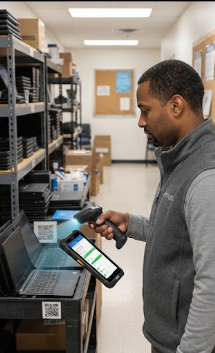
The corridor round above is what the scanner replaces: a walk past tagged equipment with the database already loaded, so the stock check happens during a free period rather than over two days of admin time. A fixed cradle at the end of the round is what keeps the device charged and findable next term.
🔋 Network and Power for a Teaching Day
The network and power plan has to assume every device starts at the same time. Confirm that the classroom access point carries the fixed machine plus a class set of tablets before the first lesson, not after, because the failure mode is always the same: everything works until thirty devices connect at once. Put the classroom machine on a protected circuit with the display so a tripped socket does not take out the room mid-lesson, and give the handhelds a labelled charging position in the staff room rather than an ad-hoc cable. Check both at installation with a real simultaneous start, which is the only test that surfaces the problem before the first day of term.
A Ten-Week Checklist
The term-long checklist is short on purpose. At the start of term: confirm the classroom machine wakes on schedule, confirm every handheld logs in and reaches the network, and confirm the F505 has the current asset list. Weekly: check that handhelds are returning to their charging points and that no cable has worked loose behind the display. At the end of term: run the asset round while the rooms are still configured, back up the classroom machine image, and note anything that needs a summer visit. That checklist takes minutes a week and prevents the two failures that actually disrupt teaching, which are a machine that will not start and a device that will not charge.
| Device | Role | Installation focus | Term-long check |
|---|---|---|---|
| Palm-sized miniPC | Fixed classroom machine | Hidden mount, labelled cables, wake schedule | Wakes on time each morning |
| SH5-W | Teacher handheld | Case and holster, any-device login | Returns to charging each day |
| Handheld PDA F505 | Asset and stock rounds | Pre-loaded database, fixed cradle | Current asset list at term start |
The table is the installation in one view: each device has a role, an installation focus, and the one check that keeps it working through a term. Walking the three rows before the first day prevents most of the support calls that a school IT team otherwise absorbs in the first fortnight.
Setting the Room Up for the Summer
The last installation step is the one that pays off next year: document the room. Photograph the cable routing before the desk goes back, note the mounting bracket type and the wake schedule, and record which devices are in which room. A school that has this documentation can reconfigure a room over the summer without a survey visit, and a new technician can support a room they have never seen. The mini PC range carries the mounting hardware and accessories that make the fixed installation repeatable across rooms, and a related installation guide for a mixed device floor covers the same method applied to a non-teaching environment.