I have sat through enough room handovers to distrust the spreadsheet. It always arrives polished, every row filled, sorted by the numbers that were easiest to publish. Brightness against brightness, resolution against resolution, weight against weight. Nothing in it is wrong. The problem is that the rows deciding whether a room actually works are the ones no quotation ever lists, because nobody can put a figure on them. So when a single purchase covers a fixed projector, a portable unit and a control tablet, the sensible move is to treat the paper as the opening of the discussion rather than the end of it.
What the Comparing Table Already Answers
The published figures are genuinely useful, and it would be foolish to skip them. They settle what the equipment is capable of in a controlled test: how much light reaches a screen, how many pixels land on it, how heavy the crate will be when it arrives, what certification backs the claims. That half of the work is real, and it should be done properly against enterprise collaboration solutions rather than against a general wish list.
What the table cannot answer is a shorter list with a longer reach. It cannot say whether the distance from the screen to the last row allows the picture to be read. It cannot say whether the battery survives the length of an ordinary agenda. It cannot say who takes possession of a device once the invoice is filed. Those three questions sit underneath every room decision, and each one belongs to a different kind of hardware.
A Wall Distance Nobody Measures First
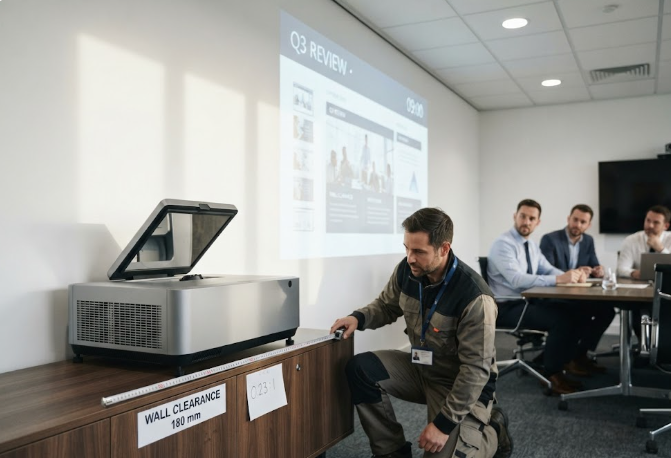
Ultra short throw projection moves the problem from the ceiling to the wall. The HT2500 Pro Ultra Projector carries a projection ratio of 0.233:1, which the product page renders as a 100-inch image thrown from a position only 7.2 inches off the wall, with the picture adjustable between 80 and 120 inches. That is a genuine advantage in a narrow room, and it also means the placement question changes completely: instead of asking how far back the unit can sit, the room has to be measured for where a cabinet or a credenza can stand without blocking anyone's sightline.
The rest of the sheet is reassuring. A 4K image from a 0.47-inch DMD with XPR shifting, 3000 ANSI lumens, a dynamic contrast figure of 1,000,000:1, and an industrial-grade laser light source rated at 25,000 hours, which the page translates into four hours of viewing a day for roughly seventeen years. The unit weighs 20kg, so a two-person install is the practical assumption, and it brings a 60W Harman Kardon soundbar with dts-HD and Dolby decoding. None of that answers the wall question. That one is answered with a tape measure, before the order exists.
How Long the Session Actually Runs
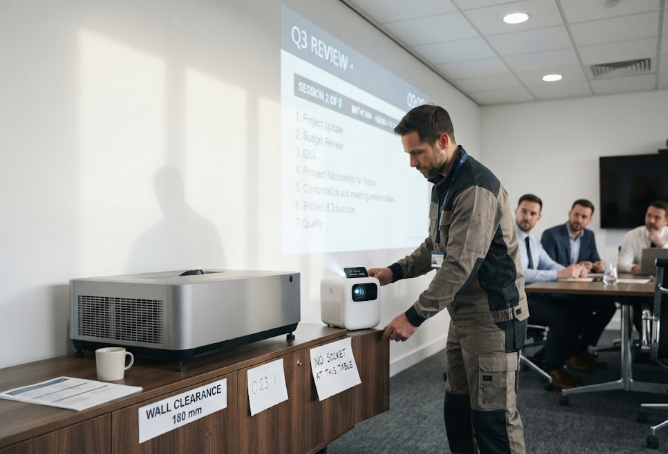
Portable projection has a different unlisted row, and it is measured in minutes rather than metres. The HT500 runs on a 3700mAh battery with 100W fast charging, which is the figure the sheet prints. What the sheet does not print is whether that figure covers the meeting you actually hold. A thirty-minute stand-up and a two-hour review draw the same number from the page and different amounts from the cell.
The rest of the design points the same way. At 183 x 164 x 61mm and just 1080g, it is well under the two-kilogram floor of a traditional business projector, and because it runs Windows 11 on an Intel Celeron N5105 with 4GB or 8GB of LPDDR4 and 256GB or 512GB of SSD storage, it does not need a laptop tethered to it. The DLP engine uses a German Osram 3LED source at 400 ANSI lumens, 1280 x 720P resolution, a 340:1 contrast ratio and an NTSC gamut of at least 90 percent, with auto-focus and keystone correction doing the setup work. So the honest procurement line reads: how many minutes of unplugged session does your longest recurring meeting need, and is the room near a socket anyway?
The Device That Gets Signed For
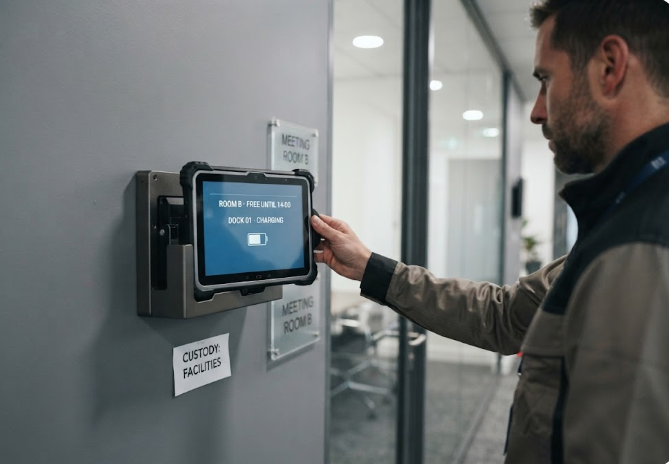
The third family is the one that quietly disappears from meeting rooms, because it is the only piece designed to be carried. The ST13-J is a 13.3-inch rugged tablet with a 1920 x 1080 IPS panel rated at 260 or 400 nits, a 10-point touch layer that accepts a stylus and a wet hand, an 8000mAh battery at 7.6V, and an Intel Celeron N5100 with 8GB of memory and 256GB of storage as standard. Its protection rating is IP65 with 1.2m drop resistance, it operates between -20 and 55 degrees Celsius, and it takes an optional dock or vehicle mount.
Notice what those last two words do to a procurement discussion. A device with a dock and a mount is a device with a home, and a device with a home needs an owner. The sheet will tell you the tablet is sealed against dust and survives a fall from waist height. It will not tell you which team keeps the charger, where the tablet lives overnight, or whose name is on the line when it goes missing after a quarterly review. That is not a hardware gap. It is a gap in the list, and it is the one that turns a working trial into a stalled rollout.
Published Figures, Column by Column
The three devices belong to different families, so there is no single set of columns into which all three fit honestly. What can be compared is which decision each one sits under, and what the sheet leaves for the room to settle.
| Line on the list | What the sheet gives you | What the room decides |
|---|---|---|
| Where the picture comes from | Projection ratio and lumen output | Wall clearance, sightlines, seating distance |
| How long it runs unplugged | Battery capacity in mAh | Length of the longest recurring session |
| Who holds the device | Protection rating and mounting options | Custody, charging and replacement owner |
For reference, the published specification each page does carry:
| Model | Display | Power | Rugged and mounting |
|---|---|---|---|
| HT2500 Pro Ultra Projector | 4K, 3000 ANSI lumens, laser light source | Mains powered, 25,000-hour lamp rating | Fixed position, 20kg, two-person install |
| Hotus HT500 | 1280 x 720P, 400 ANSI lumens, DLP | 3700mAh, 100W fast charging | Hand-carried, 1080g, no mount specified |
| ST13-J | 13.3-inch IPS, 1920 x 1080, 260 or 400 nits | 8000mAh at 7.6V | IP65, 1.2m drop, dock and vehicle mount optional |
Two Rows That Get Struck in the Final Round
When the budget meeting arrives, the same two lines are almost always the first to go, and both of them come back as costs later. The first is the install row. A fixed unit from our projector range is not a device you place on a table; it is a position, a run of power, and in some rooms a small piece of joinery so that nothing stands in front of the lens. Removing that row does not remove the work.
The second is the ownership row, and it is the more expensive omission. Someone has to be named for the tablet, the charger and the dock before the first user touches them. If that line is struck, the room inherits a device with no home and a support ticket with no owner, and the trial that was supposed to prove the concept instead proves that nobody was responsible for it.
What to Check Before the Order Goes Out
One walk-through settles more than any additional column. Sit in the furthest seat and look at the intended wall from eye level. Pull the blinds the way the room actually uses them at two in the afternoon. Carry the portable unit the way a presenter would, one hand, along the route to the room. Put the tablet on the dock and see whether the cable reaches where people stand.
If the room is used for client sessions and hybrid calls as well as internal meetings, it is worth reading the deployment notes behind business conference applications before the specification is frozen, because the same application asks for different things depending on whether the audience is in the room or on the far end of a link.
When the Unlisted Items Carry the Whole Decision
The published figures earn their place. They keep a shortlist honest and they stop a purchase from being made on enthusiasm alone. But the reason a room works six months after handover is almost never a number on the sheet. It is that someone measured the wall, someone matched the runtime to the real agenda, and someone put a name against the device that gets carried. Write those three lines into the checklist and the rest of the comparison stops being the decision and becomes what it was always meant to be: the starting point.