Remote assistance is usually sold as a travel decision. Someone on a plant floor raises a hand, an engineer joins from another city, and a call that would have cost two days becomes forty minutes. I have watched that arithmetic convince a lot of people, and I have also watched what happens a year later when a customer's compliance team asks who was on that call and what they were allowed to look at.
Hands-free support across two companies is not only a connectivity problem. Putting a camera on a customer's floor means somebody outside that company is watching it live, and the rules nobody wrote down during the pilot are exactly the ones that get asked about afterwards. There are three of them, and they are worth settling before the next unit ships.
Three Limits Missing From the Handover Sheet
A support agreement across two companies runs into three boundaries the handover sheet skips. The first is sight: a live view of a working area leaves the building as it happens, and what falls inside that frame is a decision rather than an accident. The second is access: an outside engineer holds an open channel into a customer room, and every channel needs an opening and a closing somebody defines. The third is record: both sides walk away holding something, and neither knows what the other kept.
None of this appears in a specification table, so it surfaces late, when a reviewer asks how the last call was documented. Teams that settle these boundaries before a rollout find the hardware conversation gets shorter, because the argument moves from opinions to a checklist. The pages describing remote assistance solutions are a reasonable start, but the three questions below are the ones the hardware cannot answer for you.
Sight Line: What Reaches the Screen
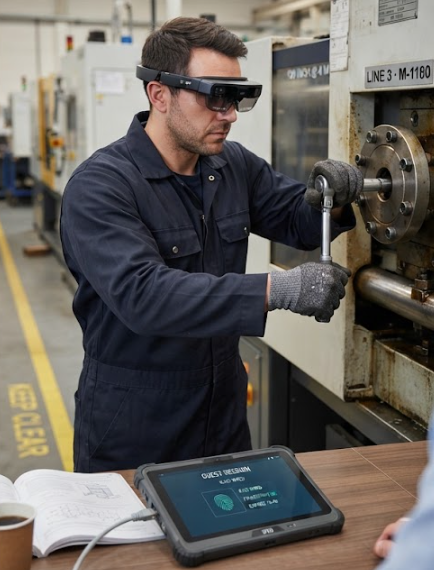
The frame in a remote call is never the whole facility. It is whatever the person on site is looking at, so the device they hold or wear sets the view, not what the expert wants to see. A tablet in one hand gives a narrow, unsteady picture of one panel. The AR Smart Glasses take the other route, letting the wearer keep both hands on the machine because the picture follows the head instead of the hand.
That difference sounds minor until you talk an engineer through a repair over a shoulder-mounted camera. The glasses carry a 51-degree field of view and project an image equivalent to a 120-inch screen at four metres, with a 0-600 degree myopia adjustment, so the wearer reads an overlay without extra optics. That field of view decides whether the expert sees the surrounding pipework and its label in one glance, or asks for the camera to move three times before a part number is readable.
What the View Leaves Out by Design
Every camera angle on a working site excludes something, and the useful question is who chose the exclusion. A view aimed at one machine normally leaves out the neighbouring line, the production board on the wall, the tooling for a different customer, and any paperwork taped inside a cabinet door. None of that is anybody's fault, but a visitor from outside the company would otherwise never have seen it.
The harder half of the boundary is that the same narrow frame also limits what the expert can conclude, and a diagnosis drawn from a partial view should be labelled as partial in the note that follows. I ask technicians to fix the camera before the call rather than chase faults with it, so the advice matches a scene the expert actually saw. Before that becomes procedure, read the published limits on our AR smart glasses range.
Getting a Guest Viewer In Without Joining the Network
There are two ways to bring an outside engineer into a room, and they carry different obligations. The first is to put them on the customer's network, which means a guest wireless profile or a cable into a switch port, and which pulls the visitor's device inside the customer's security perimeter. The second keeps the visitor on a carrier connection that never touches that perimeter, reaching the floor only through the camera in front of them.
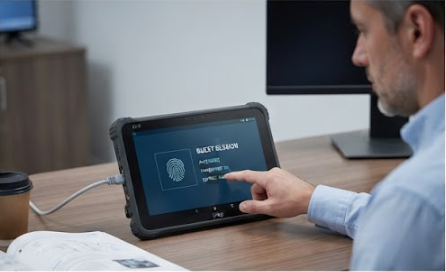
The HTXUK10A-55 makes this a real choice rather than a slogan: it carries an RJ45 port, Wi-Fi 6 and Bluetooth 5.0 on the base unit, with optional 4G. A tablet with that port list can go either way, so the choice stays with the customer's IT policy rather than the hardware. An optional fingerprint reader binds a support call to a named person rather than a shared login.
Permissions That End With the Link
The access boundary is mostly about time, and the usual failure is a credential meant for one afternoon that still works a season later. A support account created for a single walkthrough should be scoped to that room, that device set and that window, because a permission that never closes is indistinguishable from a permission nobody granted.
The physical details carry the same logic. A unit with a detachable battery can be handed over for a shift and partly stripped back at the gate, and a tablet that lives in a charging dock between visits is easier to account for than one that circulates. On the software side, a named account with a fresh enrolment each time costs minutes and removes a class of questions later. Two-factor sign-in on the expert's side is worth insisting on.
Two Records, and Who Holds Which
Two companies in one call means two recordings, and the surprise is how rarely anyone agrees in advance which of them is official. The customer usually captures the audio for a maintenance log. The vendor usually keeps a session history with notes attached. Those two artefacts serve different purposes, and a reviewer will want to know how they line up and which one wins if they disagree.
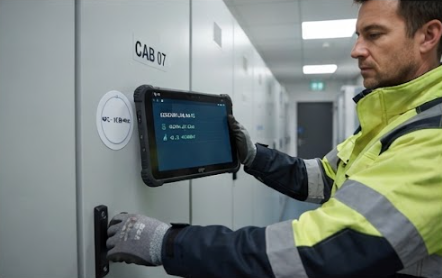
The unit on site shapes that record. The RT81 reaches the network over 4G LTE, dual-band Wi-Fi and Bluetooth 5.0, so a call can run and be logged without a customer network credential at all. It reads NFC tags at 13.56 MHz across ISO14443A/B and ISO15693, turning a visit into a timestamped event at the cabinet. The page states IP67 with a 1.2 metre drop rating, plus CE, FCC and RoHS compliance verified by a third-party laboratory.
Where Each Boundary Is Owned
The three boundaries do not belong to the same party, and the table below is the version I use when a customer asks who signs what. It is written in responsibilities rather than figures, because the figures come from the device pages.
| Boundary | Who crosses it | What the call carries | What the sheet normally omits |
|---|---|---|---|
| Sight | A viewer outside both the plant and the visiting company | A live picture of a working area, framed by whoever holds the camera | The list of things deliberately kept out of frame |
| Access | An outside engineer holding an open channel into a customer room | Identity of the viewer, the opening window, the closing action | What happens to the channel once the call ends |
| Record | Both companies, separately and without coordination | Whatever each side captured, stored on whatever each side runs | Which copy is authoritative and how long it lives |
Read against the three units, the boundaries fall out fairly cleanly. The wearable sets the sight line, since the frame follows the head and the field of view is a published number. The tablet with a wired port and an optional fingerprint reader sits on the access side, because it can join a network or stay off one while naming the person holding it. The Android unit on a carrier connection covers the record side, where an independent link does most of the work.
What none of them fixes is the paperwork, and that part is worth writing before the pilot rather than after. A short annexe naming the three boundaries, the party who owns each one and the artefact that proves it will do more for a rollout than extra hardware on the cart.
| Unit | Connects over | Verifies a person by | Protection as published |
|---|---|---|---|
| AR Smart Glasses | No radio or pairing specification listed on the product page | Nothing listed | Not published |
| HTXUK10A-55 | Wi-Fi 6 and Bluetooth 5.0, RJ45, optional 4G | Optional fingerprint reader | IP65, -20 °C to 60 °C |
| RT81 | 4G LTE, dual-band Wi-Fi, Bluetooth 5.0 | NFC at 13.56 MHz (ISO14443A/B, ISO15693) | IP67, 1.2 m drop |
The last row of that table explains why the certification column is short. Only one of these pages publishes approvals and the other two do not, so the honest entry is the one that says so rather than a guess carried over from a sibling model. Buyers compiling a tender pack should ask the vendor to confirm those two rows in writing instead of inferring them.
What to Sign Off Before the Next Session
Four items belong on the page that ships with the first unit. Name the person who may frame the call and the areas that stay out of frame. Agree whether the visitor joins a customer network or arrives on an independent link, and write down which one. Fix what happens to the account when the call ends. Decide which recording is authoritative and how long each side keeps its copy.
None of those four is a technical setting. The equipment list constrains the answers: a wearable with a wide field of view makes the framing rule practical, a tablet with a choice of networks keeps access open, and a unit that logs its own visit shortens the record argument. Buy first and document later, and all three boundaries come up again at the first audit, so settle the field service conversation before configuration.