AR Smart Glasses, HTNJ10C and N60: What the Quantity Column on an Inspection Buy List Counts
Most inspection buy lists start with a headcount. Four people on the round, so four devices — one each, same model, same order line. It reads as fair and it is almost always wrong. An inspection round is not one job repeated four times: it is a walk between tags, a form filled in at the asset, and the occasional task that leaves both hands occupied. Each of those needs a different device, and the number you buy is set by how many hours of each the round contains — not by how many people sign in. For plants laying out an industrial inspection kit, that distinction is worth real money in both directions: tablets that sit in a cabinet all week, and one pair of hands-free glasses shared by eleven people.
💡 Why the List Starts With the Wrong Column
The headcount column feels objective, so it gets filled in first and every other line is priced against it — yet the three inspection tasks do not divide evenly across a crew. On a typical shift most of the time goes to walking a tag list one item at a time; a smaller block to standing at a machine with a drawing open; and a much smaller block to jobs where the technician is on a ladder, inside a tank, or holding a live probe. Buy by headcount and you over-equip the middle task and under-equip the last one, because the last one is not a person's job — it is a moment that moves between people.
Task One: Walking a Point List in One Pass
The dominant task is the point list: walk the route, read or scan each asset, record the value, move on. Nobody sets anything down and nobody stops, and the N60 inventory management PDA is built around exactly that rhythm. A 5.99-inch IPS panel at 1080×2160 stays readable in plant light, the Cortex-A76/A53 octa-core at 2.0GHz running Android 10.0 keeps a scanning app responsive, and the optional Honeywell N6703 2D imager reads what a maintenance tag carries — PDF417, Data Matrix, QR and the rest. Storage starts at 4GB+64GB and can be ordered at 6GB+128GB, enough for a year of readings per route. The removable 4200mAh cell is rated above twelve hours with fast charging, so one unit covers a shift rather than half of one. At 164.5mm × 79.4mm × 12.3mm, with support for gloves and wet hands, it stays in a hand for five hours.

Task Two: Reading a Form Where It Is Used
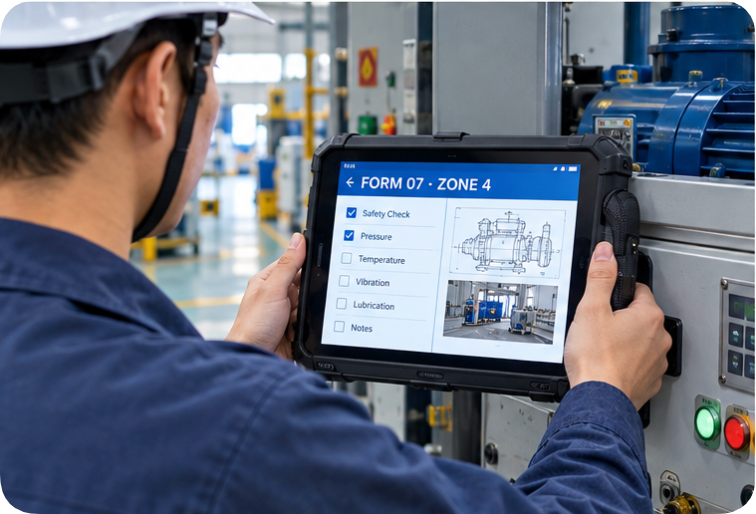
The second task is the one buyers forget, because it looks like paperwork rather than work: the technician stands at the asset with a drawing, a handover form or a fault sheet and reads it in place instead of carrying it back to an office. That needs a page-sized screen and a network port, not a phone. The HTNJ10C rugged tablet answers with a 10-inch LCD at 1200×1920 and 560 nits, readable in daylight, and a 10-point capacitive panel hardened to 7H so a gloved finger still registers. An Intel N100 four-core processor at 3.4GHz runs the client software on the machine, WIFI6 and BT5 connect it, and an RJ45 port allows a wired drop to a panel cabinet where wireless policy forbids one. IP67 sealing with 1.22M drop resistance lets it sit on a machine frame rather than a bench, and the interface set — Mini HDMI, Type-A, Type-C, TF, SIM and a 12-pin POGOPIN — covers a barcode gun, a memory card or a dock as the site grows. At 28.4cm × 19cm × 2.5cm and 2.1kg gross, it lives in a zone, not on a person. Count it by area, not by crew.
Task Three: Keeping Both Hands on the Job
The third task breaks a headcount plan because it belongs to a moment, not a person. Someone is on a ladder, inside a confined space, or holding a probe against a live panel with both hands committed, and the record still has to be made. This is where the AR smart glasses earn their line. A 120-inch equivalent screen at four metres and a 51-degree field of view put a drawing or a checklist into the line of sight without a hand holding it, the 1080P display keeps text legible, and motion tracking keeps that image where it was placed as the head moves. A 0-600 degree myopia adjustment saves fitting prescription lenses into a hard hat. Buy these by the number of high-risk tasks per week, not the number of technicians: one or two units in a shared pool usually covers a plant, provided the pool has a charging home and a named owner.

⚖️ The Ratio Between the Three Shapes
Once the shift is described in hours rather than people, the quantity column writes itself. Take an eight-hour round: five hours walking a point list, two hours of form work at assets, one hour needing free hands. The handheld line needs one unit per route, per shift. The tablet line is shared across a zone, so four zones need fewer tablets than the plant has technicians, with a spare on a dock. The free-hands hour moves between people, so a pool of one or two is enough — provided the pool is scheduled, or the week two crews need it at once is the week the practice quietly stops. None of that can be expressed in a headcount.
What the Quote Numbers Do Not Cover
A quotation lists units, unit price and lead time. It does not list the dock, the spare battery, the screen film, the lanyard, or the second batch that has to match the first. The N60 keeps its battery removable, so a spare cell is worth pricing before the first failure rather than after. The HTNJ10C takes an optional charging dock, which changes how a zone is handed over at shift change. If the plant runs mixed hardware, browse our rugged tablet range before fixing on a single model, a common dock and charger reduce what goes missing. Every one of these is a real cost, and none appears in the column the buyer reads first.
The Line That Turns a Purchase Into a Routine
Equipment stops being used when nobody owns the boring half of it. Before the order goes out, add one line naming who collects the devices at shift end, where they charge, and who checks the count against the sign-out sheet. It is the cheapest line on the document and the one that decides whether the others were worth buying. Plants that run several sites often compare these arrangements across hardware before they standardise — the product comparisons section is where those trade-offs get written down rather than argued out.
Record These Numbers From the First Month
The second buy list should not be a guess either. Track three figures through the first month: hours the round spends walking a point list, how often a technician waits for the shared tablet, and how often the free-hands hour overlapped with another crew. Those three numbers, taken from your own plant rather than a brochure, are what turn the next quantity column into an argument nobody can dismiss.
| Specification | N60 Inventory Management PDA | HTNJ10C Rugged Tablet | AR Smart Glasses |
|---|---|---|---|
| Primary task on the list | Walking a point list in one pass | Reading a form at the asset | Working with both hands committed |
| Display | 5.99in IPS, 1080×2160 | 10in LCD, 1200×1920, 560nit | 1080P, 120-inch equivalent at 4m |
| Processor | Cortex-A76/A53 octa-core, 2.0GHz | Intel N100, 4 cores 4 threads, 3.4GHz | Motion tracking and spatial computing |
| Memory and storage | 4GB+64GB, optional 6GB+128GB | Not published on the product page | Not published on the product page |
| Sealing and shock | Rugged chassis, gloves and wet hands | IP67, 1.22M drop resistance | Worn on the head, no handheld case |
| Power | Removable 4200mAh, above 12 hours | 7.6V/3500mAh, AC100-240V adaptor | Not published on the product page |
| Wired and wireless | 5G/4G/3G/2G, WLAN 2.4GHz/5GHz | WIFI6 and BT5, RJ45, SIM, Mini HDMI | Wearable, hands-free operation |
| How many to buy | One per route, per shift | One per zone, on a dock | One or two in a shared pool |
None of the three devices is the answer on its own. The list works when the hours are described first and the units follow, which is the opposite of how most inspection purchases get written.