💡 Why an Annual Service Sheet Misses This Room
Most maintenance calendars are built on two numbers, months and hours, and both of them quietly describe the wrong load in a business meeting room. A projector that runs for four fifty-minute sessions a day shows less than three and a half hours on any hour meter. The same projector was switched on four times, warmed from room temperature four times, and allowed to shed that heat four times. Read through the hour column it looks lightly used. Read through the start column it is the hardest worked projector in the building, because a home cinema unit with an identical light source is switched on once and left alone for the evening. That mismatch is why the schedule keeps slipping, and it sits inside a wider set of business conference solutions rather than being a quirk of one product.
So this page works from a different clock. Instead of asking how many months a device has been in service, it asks how many times it has been started, who was in the room when that happened, and whether the window for doing anything about it is fifteen minutes or a full afternoon.
Equipment Nobody Signs For
A home projector belongs to somebody. It sits in one room, it is used by the people who chose it, and when the fan starts to sound different the person who hears it is the person who will pay for the replacement. None of that holds in a shared room. The projector on the ceiling was specified by a facilities committee, installed by a contractor, and is operated by whoever booked the slot. The mini PC in the cabinet has no workstation, no named user and no login that anybody remembers, because the presentation is driven from a laptop that the visitor brought in.
The consequence is not really an ownership problem, though it usually gets filed as one. It is a detection problem. Small symptoms that a private owner would notice in a week, a slight colour shift, a fan that takes longer to settle, a port that needs the cable to be seated twice, have nobody in a position to notice them, because no single person sees the device on consecutive days. What a shared room does leave behind is recorded evidence, and there are exactly two kinds of it: the booking system that knows how often the room was taken, and the device itself, which knows how often it was started.
Booking Counts, Not Hour Meters
Those two records together are a better predictor of wear than runtime, and for a reason that has nothing to do with marketing. Damage in these devices accumulates mainly at the boundaries of operation rather than in the middle of it. A light source, a capacitor bank and a solid state drive are all comfortable once they are at working temperature and steady. The expensive moments are the transition, when inrush current is highest, when materials expand at different rates, and when a fan is still spinning up and the heat has nowhere to go yet. Ten hours of continuous projection and ten sessions of one hour put the same number on the hour meter and a very different number on the hardware.
A meeting room sits at the extreme end of that difference. A typical weekday in a mid-size company runs a morning stand-up, a client call, a lunchtime review and an afternoon training session, which is four full thermal cycles before anyone cleans the whiteboard. The same equipment installed in a home office would see one start a day and usually none at the weekend. Since the booking system already records every one of those four sessions with a start time and a room name, the maintenance schedule can be driven from data the business is already collecting.
Where Repeated Starts Land on Projectors
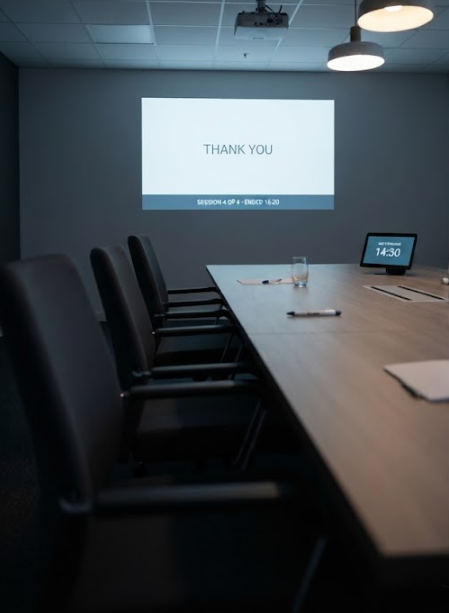
The HT2500 Pro Ultra is the fixed half of this room, and its published figures explain why the start count matters more here than almost anywhere else. It is quoted at 3000 ANSI lumens with 4K resolution and a dynamic contrast ratio of 1,000,000:1, built on a 0.47 inch DMD panel with XPR shifting and a laser light source. The throw ratio is 0.233:1, which is what allows it to hang within centimetres of the wall it projects onto, and the whole assembly is a 20 kg unit that is meant to be installed once and left in place.
Two of those specifications turn directly into maintenance actions. The short throw distance means the intake sits far closer to a wall surface than it would on a long throw projector, so the gap behind the housing is a working part of the cooling system rather than a decoration, and it collects whatever the room's carpet and upholstery release into the air. The laser source has a rated life in hours, but what shortens it in practice is the heat that stays in the housing after a session ends and the next one begins before the fan has finished. For this projector, the useful habits are low-tech: keep the gap behind the wall clear, never cut power at the wall switch while the fan is still running, and leave the 20 kg installation where the installer put it rather than moving it between rooms.
📱 A Mini PC Never Left Running
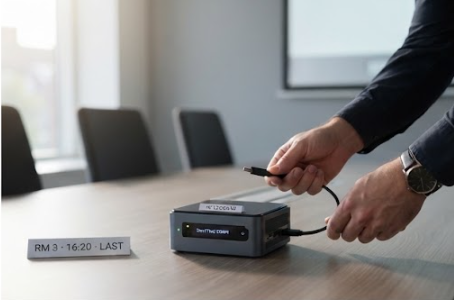
The HCAR5000 MI is the device most likely to be misjudged, because the same machine appears elsewhere in a completely different role. It runs an AMD Ryzen 5000H series processor, either a 5900HX, 5800H or 5600H depending on configuration, with Radeon graphics, DDR4 at 3200MHz up to 64GB, and storage that can be an M.2 2280 SSD from 128GB to 1TB or a 2.5 inch 7200rpm drive. The chassis measures 202 by 212 by 65mm and weighs 2455g, with one RJ45 port, three USB 3.0 ports, two USB 2.0 ports, DisplayPort 2.0b, an audio jack and a Type-C port that carries video. Windows 10 or 11 ships as standard, with a Linux soft router build offered as an alternative.
That last detail is the whole problem. In its soft router configuration this box is expected to run for months without a restart, and it is designed to be perfectly happy doing so. In a meeting room the same hardware becomes a device that is powered up four times a day and shut down again four times a day, which is a heavier pattern for the power delivery components even though the processor spends most of its life idle. The practical fixes are about how it is switched rather than how it is used. Windows fast startup turns a shutdown into a partial hibernation, which means the machine is not actually restarting cleanly between sessions; a master switch that cuts the whole cabinet at the end of the day is the most damaging habit available, because it removes cooling before the power supply has settled, and scheduling an actual restart once a week costs nothing and clears whatever the presentation software has been leaving in memory.
A Slot Nobody Booked
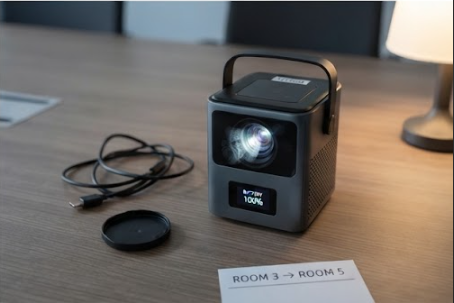
The third device behaves differently again, because it does not stay in one room. The HT500 is built as a portable unit that works as both a projector and a computer, with a touch control panel and a Win11 system on board, and a built-in battery so that it can be carried somewhere without a socket. In an office it ends up doing the jobs the fixed installation cannot: the overflow session when two meetings collide, the demonstration in a corridor, the off-site day. Moving between rooms is the point of it, and it is also what ages it fastest.
Maintenance for a portable unit has a scheduling constraint that the fixed ones do not, and it is worth naming clearly. The work cannot be done after hours, because after hours the room belongs to the cleaning staff and the device is usually locked in a cabinet. What is available is the gap between two bookings, and those gaps are visible in advance on the same calendar that creates the demand. Fifteen minutes is enough to wipe a lens and check that the vents are clear. Anything that involves opening a compartment, updating firmware or running the battery through a charge cycle needs the longer gap, and it is far easier to claim one of those slots a week ahead than to find one on the day.
What Many Hands Leave Behind
Shared equipment wears in places that a single user never touches, and those places are physical rather than electronic. The connectors take the worst of it: a Type-C port on a portable unit and a DisplayPort socket on a fixed installation are each designed for a mating cycle count that assumes one person plugging in one cable in one orientation, and a meeting room supplies a rotating cast who arrive with whatever adapter they carry. Lenses accumulate fingerprints from being adjusted by hand rather than by remote. Batteries in portable units tend to live permanently on charge, which is the opposite of what a lithium pack prefers, and the receivers of a room that is booked solid never get the discharge cycle that would keep their gauges honest.
A short handover list taped inside the cabinet door does more than a long procedure document, because the person executing it is a visitor rather than a technician. Three items are usually enough: cables returned to the labelled hook rather than left in the socket, the lens wiped with the cloth that is stored with the unit instead of a sleeve, and the portable unit taken off charge once its indicator shows full. Anyone specifying a room around this kind of equipment will find the practical differences between form factors easier to see across the full hardware range than in any single datasheet.
🔧 A Care Table Built on Starts
Set against each other, the three devices do not divide by performance. They divide by where they sit and what actually wears them out, and the table below keeps only the fields that follow from those two things.
| Model | Where it sits | What ages it first | When the work gets done | The habit that shortens its life |
|---|---|---|---|---|
| HCAR5000 MI | Inside a locked cabinet | Cold starts, four a day | Any booked gap, plus one weekly restart | A cabinet master switch cut at 18:00 |
| HT2500 Pro Ultra | Fixed, centimetres from the wall | Heat retained between sessions | Before the first booking of the day | Cutting power while the fan is still running |
| HT500 | Carried between rooms | Connector mating and time on charge | Between two back-to-back bookings | Stored permanently at 100 percent |
Nothing in that table depends on a service contract, and none of it requires a technician for the routine items. What it does require is that the schedule be anchored to the booking system rather than to a wall calendar, because the room already publishes how often it will be used and the devices already record every one of those starts. The purpose of the published comparisons on this site is the same one that applies here: to keep every claim traceable to something a buyer can check, whether that is a lumens figure on a datasheet or the number of times a room was booked last Tuesday.